
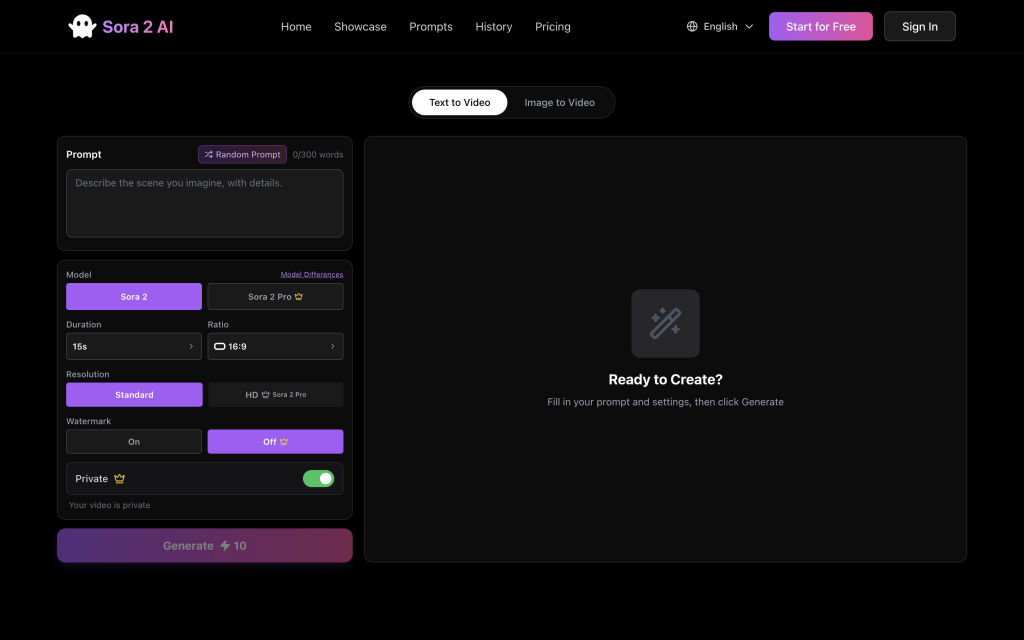

Sora 2 AI is a next-generation text-to-video studio that turns natural-language prompts into cinematic clips within seconds. Describe the scene you imagine, optionally guide it with a reference image, then let Sora’s diffusion-based models handle camera motion, lighting, and pacing to deliver 10–25 second renders in 720p or 1080p. Creators rely on it to prototype ads, ship social content, teach with visual explainers, and storyboard films—without editing suites or crews. Credits-based pricing keeps costs predictable, while Pro plans unlock watermark-free exports, private generations, faster queues, and a 5K+ monthly credit pool. A built-in prompt library, creation history, and compliance-friendly portrait catalog help teams stay organized, iterate faster, and avoid rights issues, making Sora 2 AI a full-stack operating system for modern video storytelling.
Key Points :
What Exactly is Sora2AI?
First, let’s clear the air. Sora2AI is not OpenAI’s Sora.
It is an AI video generation platform that likely uses a combination of open-source video models (similar to Stable Video Diffusion or proprietary variants) to generate video from text. It’s branded to catch your eye, but the utility is real.
Unlike the “waitlist-only” big players, you can go to the site right now, type a prompt, and get a video. That accessibility is its biggest selling point.
Step-by-Step: How to Create Your First Cinematic Clip
I didn’t want to just make a random cartoon; I wanted to see if I could make something that looked like a Netflix documentary. Here is the exact process I used.
Step 1: The Setup
Head over to sora-2-ai.com. You’ll notice the interface is clean. No complex node graphs like ComfyUI—just a text box and some settings.
Step 2: The “Secret Sauce” Prompt Formula
Most people fail here because they type like they are talking to a human. Don’t do that.
Through my testing, I found that Sora2AI responds best to this structure:
[Subject + Action] + [Environment/Lighting] + [Camera Movement] + [Style/Film Stock]
My Test Prompt:
“A cyberpunk street food vendor cooking noodles in neon rain, steam rising hot, 35mm film grain, cinematic lighting, bokeh background, slow camera pan right, highly detailed, Blade Runner style.”
Step 3: Adjusting the Settings
Before hitting generate, check the aspect ratio.
- 16:9: Best for YouTube/Desktop.
- 9:16: Essential if you are making content for TikTok or Instagram Reels.
I switched to 16:9 for my cinematic test.
3 Common Mistakes to Avoid
After generating about 20 videos, I noticed a pattern in the failures. Avoid these traps:
- Too Much Motion: asking for “A man running, jumping, and landing on a car” confuses the model. It will likely warp the character. Stick to one clear action per clip.
- Vague Lighting: If you don’t specify lighting (e.g., “sunset,” “studio lights,” “neon”), the AI defaults to a flat, boring TV-drama look.
- Ignoring Ratio: Generating a landscape video and trying to crop it for TikTok later looks pixelated. Generate in the native aspect ratio you need.
Sora2AI vs. The Competition
How does it stack up against the other tools I use?
| Feature | Sora2AI | Runway Gen-2 | Luma Dream Machine |
| Accessibility | Instant Access | Available | Waitlist/Slow |
| Speed | Fast (~2 mins) | Fast | Slow |
| Realism | 7/10 | 8/10 | 9/10 |
| Cost | Freemium | Paid Credits | Limited Free |
My Take: Luma might have slightly better physics, but Sora2AI is much faster for rapid prototyping. If you just need a quick clip to visualize an idea, this is the tool to use.
My Final Verdict
So, what’s the bottom line?
If you are a filmmaker expecting to replace your camera today, Sora2AI isn’t there yet (nothing is). However, if you are a content creator, marketer, or storyboard artist, this tool is a fantastic asset. It allows you to visualize concepts instantly and generate unique background visuals for social media without copyright strikes.
My recommendation: Use it for “texture” videos—rain, fire, clouds, cityscapes, and food. These come out looking 99% realistic. Avoid complex dance moves or intricate hand interactions for now.
Have you tried Sora2AI yet? I’m curious if you’ve found a prompt hack that fixes the “hand glitch.” Drop your best prompts in the comments below and let’s figure this out together!
 Login with Google