
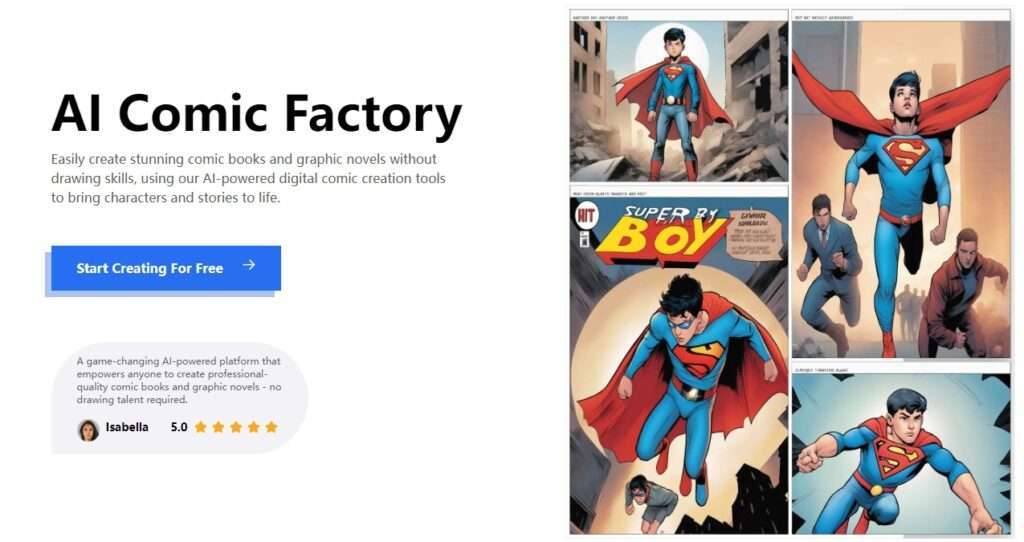

Making comic creation a breeze for users of all ages, AI Comic Factory provides a user-friendly interface and streamlined tools. Whether you’re a child or an adult, the intuitive design ensures that anyone can easily bring their comic ideas to fruition. AI Comic Factory empowers users to effortlessly design expressive characters, create engaging dialogues, and craft visually appealing panels.
AI Comic Factory Review: I Tried It, Dug Through Reddit, and Here’s the Real Story
If you’ve been seeing “AI Comic Factory” pop up in your feeds and wondered whether it can actually help you make comics without drawing skills—same here. I spent time on the official site, poked at the “how it works” claims, compared pricing pages, and read what real users say on Reddit and YouTube. Below is the most useful, no-fluff overview I could put together.
What it is: An AI-powered comic and graphic novel generator that turns your text/story prompts into multi-panel comic pages.
Best For: Writers, marketers, educators, and solo creators who want fast comic pages without drawing, plus hobbyists experimenting with AI art styles (manga, “classic comic,” etc.).
My Key Finding: Across sites and reviews, the big unlock is speed + layout templates; character consistency exists (on paid plans) but still takes iteration.
What is AI Comic Factory?
AI Comic Factory is a web app that generates comic panels and pages from your written prompts. You pick a style and layout, describe your scene/dialogue, and the system builds a multi-panel page for you—no drawing required. The .art site pitches it as a “game-changing” way for anyone to create professional-quality comics or graphic novels, with beginner-friendly steps and an FAQ that emphasizes flexible panel layouts, captions, and quick refresh/iteration.
Behind the scenes, there’s also a long running Hugging Face demo credited to the project’s origins, which is why you may have seen free “try it” videos floating around. That demo established the “type text → get panels” pattern that many tutorials still reference.
Features of AI Comic Factory
- Style Picker (Manga / Classic / Digital, etc.): Choose a visual style for your page so your panels share a coherent look. The site highlights manga, American comic, watercolor, and more.
- Layout Templates: Start from pre-built panel grids (single/double page modes are noted on paid plans elsewhere) to speed up storytelling structure.
- Prompt-to-Panels Generation: Type your narrative or dialogue; the AI composes panel imagery and page art from that input.
- Caption & Dialogue Editing: Add or tweak captions/balloons to clarify the story without re-rendering the entire page.
- Quick Refresh / Iteration: Not happy with a panel? Regenerate new variants and fine-tune with the prompt editor.
- Character Consistency (Paid): Plans explicitly mention “character consistency” and “upload your own character,” which is important if you’re making multi-page stories. Expect some trial-and-error, but the feature exists.
- Model Options on Higher Tiers: Premium/Advanced plans mention support for newer image models (e.g., FLUX.1), which generally improves fidelity and style control.
- Ad-Free & Faster Renders (Paid): Subscriptions remove ads and speed up image generation.
Use Cases of AI Comic Factory
Who is this really for? From my digging:
Related Posts
- Writers without an artist: Get storyboard-level pages for pitches, web serials, or personal projects—fast. Many YouTube tutorials frame it exactly this way.
- Educators & Students: Turn essays, history events, or creative writing assignments into bite-size comics that are easier to present and remember. (Templates + captions help a lot.)
- Marketers & Social Media Teams: Produce quick explainer strips or narrative carousels that stand out in feeds—without contracting an illustrator every time.
- Indie Creators Testing Ideas: Rapidly prototype plot beats and iterate on visual direction, then hand off winning pages to an artist for final polish. This “prototype first” tip pops up often in community posts.
- Print-on-Demand Experiments: Some creators adapt generated panels for merch mockups (mugs, zines). You’ll still need to watch print resolution and usage rights.
How To Use AI Comic Factory (What I Did)
To get a feel for it, I followed the basic flow the site describes:
- Go to the site and click “Start Creating For Free.” You’ll land on a simple, style-first flow.
- Pick a Style. I selected a manga-ish template so all panels feel cohesive.
- Choose a Layout. I grabbed a 3–4 panel layout to keep the story tight.
- Write the Prompt & Dialogue. I typed a short scene (who/where/what + mood), then added brief dialogue lines per panel in captions.
- Generate & Iterate. I hit “Go,” then used refresh on any panel that felt off. If a face shifted too much between panels, I refined the prompt and tried again. (If you’re on a paid plan, the character-consistency tools help here.)
- Export/Share. The .art site talks generally about sharing/publishing options; tutorials often show people exporting pages for posts or printing. Your exact export path may depend on which version/plan you’re using.
Tip I kept seeing in videos: start with tighter, more specific prompts (character description, camera angle, emotion, setting) and keep panel-to-panel prompts consistent so the AI doesn’t drift.
Community & Media Pulse (What Others Are Saying)
- YouTube Tutorials: Creators like to showcase “idea → full page in minutes,” often praising speed and approachability. They also note that better prompts and some manual iteration dramatically improve results.
- Reddit Threads: The consistent theme is: fun for prototyping and short pieces; full graphic novels are harder due to character drift and story coherence. Some posts specifically ask whether Premium helps with more control—short answer: yes, but it’s not magic.
- Site Confusion: Multiple domains + a free demo have led to threads asking which place to use or pay. Worth double-checking the feature set on the page you’re on.
- Legal/Copyright Concern: You’ll see reminders that purely AI-generated art can be tricky for copyright in certain jurisdictions. If you need commercial certainty, consider adding meaningful human authorship (layout, text, edits) and/or consult counsel. (This point often comes up in community replies.)
General Sentiment:
People love how fast it is to get decent-looking pages, especially for ideation, social posts, and short comics. Tutorials repeatedly emphasize prompt quality and iteration. Power users want tighter character/scene continuity; paid features help but don’t eliminate the need to steer the model.
FAQ (Collected from Real Questions)
1) Is Premium worth it if I’m on the fence?
If you’re doing more than quick experiments, Premium’s credits, speed, and consistency options are the draw. Several users ask this exact question and generally conclude it’s helpful if you’re serious—but it won’t magically fix every continuity issue.
2) Can I actually make a full graphic novel with this?
You can prototype it, yes. Finishing a long, coherent book is harder because of character drift and panel-to-panel continuity. Many creators use AI Comic Factory for layouts and idea testing, then refine (or commission) final art.
3) Why are there multiple AI Comic Factory websites?
There’s a history here: a Hugging Face demo, plus different domains (.art, .com, .org). Redditors have called this out. Always check the features/plan on the specific site you choose.
4) Does it support newer models?
Yes, higher-tier plans call out support for newer models like FLUX.1, which typically improves style fidelity and detail.
5) What about usage rights and copyright?
Read the terms on the plan you buy and be mindful of your jurisdiction. Community members often warn that purely AI-generated works may face copyright limitations in some places. If you need commercial clarity, layer in human authorship and get legal advice.
So, what’s the bottom line?
AI Comic Factory is a genuinely useful “idea-to-pages fast” tool. If you’re a writer, teacher, or marketer who wants quick, styled multi-panel pages without drawing, it delivers—especially for short stories, promos, and experiments. If you’re aiming for a long, character-consistent graphic novel, plan on some iteration (and probably a paid tier) to tame drift—or use it as a strong storyboard step before final art.
Have you tried AI Comic Factory? Share your experience in the comments on AiSupersmart.com—what worked for you, and what didn’t?
 Login with Google