
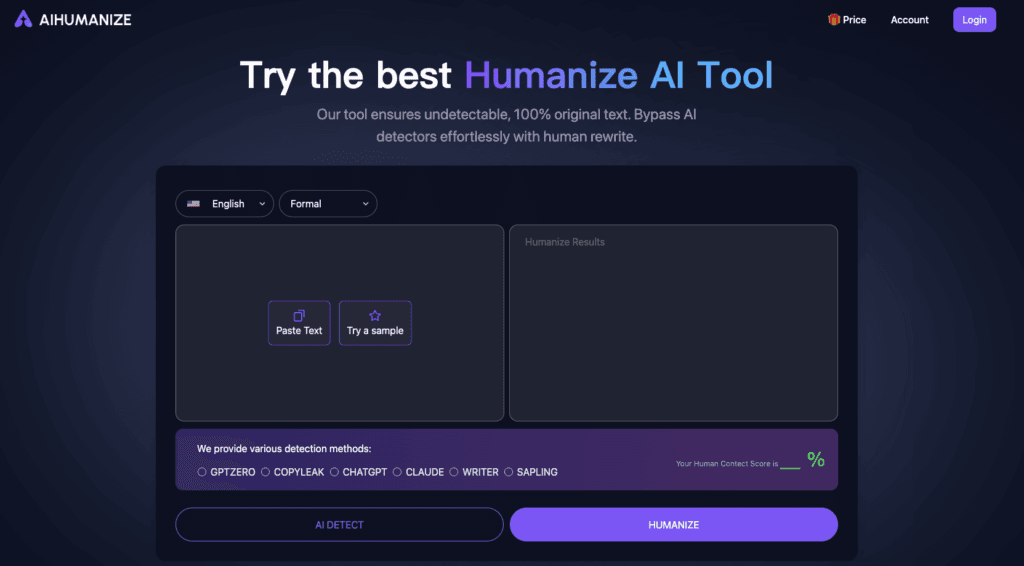

AI Humanize is a tool that turns AI text into human-like writing, helping users avoid AI detection. It works in three steps: paste AI-generated text, check AI content with ‘AI Detect’, and ‘Humanize’ to create undetectable content. It offers a free trial and various pricing plans for content creation and privacy.
Okay, my friend, you came to the right place! I’ve dug through everything, from the nitty-gritty details on the AI Humanize website to the real-world chatter on Reddit, so you don’t have to. If you’re looking to make your AI-generated text sound… well, less like AI and more like you, then let’s dive into AI Humanize.
Here’s my definitive take after meticulously researching this tool.
AI Humanize: I Explored Everything It Can Do
What it is: AI Humanize is an online tool designed to transform AI-generated text into natural, human-like writing that aims to bypass various AI content detection systems.
Best For: Students, professionals, writers, and bloggers who need to ensure their content is perceived as human-written and passes AI detection checks.
My Key Finding: While AI Humanize promotes a high success rate in bypassing popular AI detectors, my research shows that its effectiveness can vary across different detection tools, with some users and reviews reporting mixed results, especially with more advanced checkers.
What is AI Humanize?
In today’s content landscape, AI writing tools are incredibly powerful, but they often produce text that can feel a bit robotic or, worse, be flagged by AI detection software. That’s where AI Humanize steps in. It’s a specialized AI humanizer tool that takes your AI-generated content and rewrites it to sound more natural, authentic, and genuinely human. The core problem it solves is helping users convert AI text into human text, ensuring it maintains readability, relatability, and originality, all while aiming to evade AI detection.
Features of AI Humanize
After spending time on their site and looking at what others are highlighting, here’s a breakdown of AI Humanize’s key features:
- AI Detection Bypass: This is the flagship feature. AI Humanize claims to transform your content to bypass a range of AI detectors, including prominent ones like Turnitin, GPTZero, Copyleak, ZeroGPT, Quillbot, Writer, Sapling, and Originality.
- Scene-Based Writing Engine: The tool offers specialized writing styles for different contexts, such as academic papers, blog posts, formal documents, informal communication, or general text, and even options to expand or simplify content. This means it tries to adapt its rewriting to the specific purpose of your text.
- Multiple Versions (Rewrites): You can generate diverse rewrites with a single click, providing options to choose the most suitable humanized output.
- Autopilot Pro Mode: This advanced mode, available in paid plans, offers a higher (99%) detection bypass guarantee by rewriting content multiple times until it achieves a 0% AI score.
- AI Score & Report Viewer: After processing, the tool shows an “AI Score” for your text and allows you to view detailed AI reports specifically for GPTZero and Turnitin.
- Private Rewriting Models: For paid users, AI Humanize offers private models that are updated to stay undetectable, enhancing the chances of bypassing detection.
- History Tracking: The platform keeps a record of your past rewrites, which is super handy for revisiting previous versions.
- User-Friendly Interface: Several reviews noted its intuitive design, making it easy to navigate even for those without much technical experience.
Use Cases of AI Humanize
AI Humanize is built for anyone who uses AI to generate text but needs that text to sound genuinely human and pass scrutiny. Based on my research, here’s who benefits most and how:
- Students: I’ve seen countless discussions about students using AI tools for assignments. AI Humanize helps them transform AI-generated drafts into original, human-sounding content, aiming to ensure their work is indistinguishable from human-written content and passes academic AI detection tools like Turnitin.
- Writers & Bloggers: If you’re churning out content with AI but want it to connect with readers and rank well on search engines, this tool is for you. It helps convert AI drafts into engaging, natural-sounding content that boosts SEO and reader engagement.
- Content Marketers & SEO Specialists: In an age where Google is reportedly penalizing AI-generated content that doesn’t comply with spam policies, marketers can use AI Humanize to add a human touch to articles, newsletters, emails, and other marketing materials, making them more relatable and interesting.
- Professionals: Whether it’s reports, emails, or presentations, professionals can use the tool to refine AI-generated text, ensuring documents maintain professionalism and originality while bypassing internal or external AI checks.
- Researchers & Journalists: For those who need to maintain academic integrity or journalistic standards, the tool can help convert AI-generated summaries or drafts into content that aligns with ethical guidelines for human-written work.
How To Use AI Humanize?
Getting started with AI Humanize is pretty straightforward, focusing on a simple input-process-output flow. Here’s how I’d walk through the steps:
Related Posts
- Head to the Website: To get started, I first navigated to the AI Humanize homepage at aihumanize.io. Right away, you’ll see a large text input box.
- Paste Your AI Text: I’d then copy my AI-generated text from ChatGPT, Gemini, or any other LLM and paste it directly into the input box on the AI Humanize website. There’s also an option to “Try a sample” if you just want to test it out.
- Choose Your Rewriting Experience & Style: Before clicking “Humanize,” I’d look at the options below the input box. You can select between “Basic” and “Autopilot Pro” (if you have a paid plan). I’d also check the “General” dropdown menu to see if a specific style (like Academic, Blog, Formal, or Informal) is more appropriate for my text.
- Click “Humanize AI Text”: Once my text is in and any settings are adjusted, I’d hit the prominent “Humanize AI Text” button. The tool then processes the content using its algorithms.
- Review the Output and AI Score: After a few seconds, AI Humanize will display the rewritten, humanized version of your text. Crucially, it will also show an “AI Score” and often provide options to “View GPTZero and Turnitin AI Report.” I’d carefully review the rewritten text for natural flow, grammar, and context.
- Refine (If Needed): If the text still doesn’t quite hit the mark or if the AI score isn’t as low as desired, I’d use the “Humanize Again” feature (especially with Autopilot Pro) to get further refinements.
FAQ
Based on the buzzing conversations across Reddit and other tech forums, here are some common questions people have about AI Humanize:
Does AI Humanize actually work to bypass all AI detectors?
AI Humanize claims a high success rate against many popular AI detectors, including Turnitin, GPTZero, and Copyleak. However, my research indicates mixed results in the community. While some users report success, others, like a review by Originality.ai, found it detectable by their checker. [cite:R3, B5] The effectiveness can depend on the specific detector and the quality of the original AI text.
Is there a free version of AI Humanize?
Yes, AI Humanize offers a free tier. When you sign up, you typically get 2000 words to start and access to basic features and styles. The free version has limitations, such as lower detection bypass rates (around 70%) and fewer rewrites per request compared to paid plans.
What kind of text styles can AI Humanize convert?
AI Humanize is quite versatile, offering various rewriting styles through its scene-based writing engine. You can choose from General, Academic, Blog, Formal, Informal, Expand, and Simplify, allowing it to adapt to different contextual requirements.
Is it ethical to use AI Humanize for academic work?
This is a hot topic, especially on student forums. AI Humanize positions itself as a tool to make AI content “indistinguishable from human-written content” for assignments. However, academic institutions generally require students to submit their own original work. Using such tools to pass AI-generated text as entirely human-written without disclosure often violates academic integrity policies. Users should always adhere to their institution’s guidelines regarding AI assistance.
How do the “Basic” and “Autopilot Pro” modes differ?
The “Basic” mode offers around a 70% detection bypass rate with a single rewrite per request, requiring more manual quality control. “Autopilot Pro” (a paid feature) boasts a 99% detection bypass, allowing multiple rewrites until the AI score is 0%, aiming for a perfect human result. It’s designed for more critical content that absolutely needs to be undetectable.
Conclusion
So, what’s the bottom line? AI Humanize is a powerful tool for anyone looking to bridge the gap between AI-generated efficiency and the need for authentic, human-sounding content that can pass AI detection. Its array of features, from customizable styles to an intuitive interface, makes it a compelling option for students, writers, marketers, and professionals. While its ability to bypass all detectors consistently is still a point of debate in the community, it certainly offers a robust solution for enhancing text quality and aiming for undetectability. If you regularly use AI for drafting and need that extra layer of humanization, AI Humanize is definitely worth exploring.
Have you tried AI Humanize? Share your experience in the comments!
 Login with Google