

Create realistic AI sounds with our AI sound effect generator. Customize and produce high-quality artificial intelligence sound effects for your projects. Try it now!
AISoundEffectGenerator.com Review: A Deep Dive into Custom Sound Creation
If you’ve ever spent three hours scouring a stock audio library for the “perfect” sound of a wet sponge hitting a metal radiator, you know the struggle. I’ve been there, and it’s a productivity killer. That’s why I was so intrigued when I stumbled upon AI Sound Effect Generator.
I decided to put on my researcher hat and see if this tool actually lives up to the hype or if it’s just another AI gimmick. Here’s everything I found.
What it is: A specialized AI tool that generates high-quality, original sound effects based on text descriptions.Best For: Content creators, indie game developers, and video editors who need unique foley and SFX on demand.My Key Finding: Its ability to interpret abstract adjectives (like “distorted,” “haunting,” or “metallic”) makes it much more versatile than searching for tagged keywords in a traditional database.
What is AI Sound Effect Generator?
AI Sound Effect Generator is a web-based platform designed to turn your words into audio. Unlike traditional sound libraries that host a finite number of pre-recorded files, this tool uses a generative model to “hallucinate” new sounds from scratch.
The core problem it solves is two-fold: uniqueness and speed. Since the AI generates a new sound every time, you aren’t using the same “Explosion #4” that everyone else on YouTube is using. From my research on their site, it’s clear they’ve built this for people who need professional-grade foley without the professional-grade studio price tag.
Features of AI Sound Effect Generator
After exploring the interface, here are the features that stood out most:
Related Posts
- Text-to-Audio Synthesis: This is the heart of the tool. You type a prompt, and the AI interprets the physics and texture of that sound to create a matching audio file.
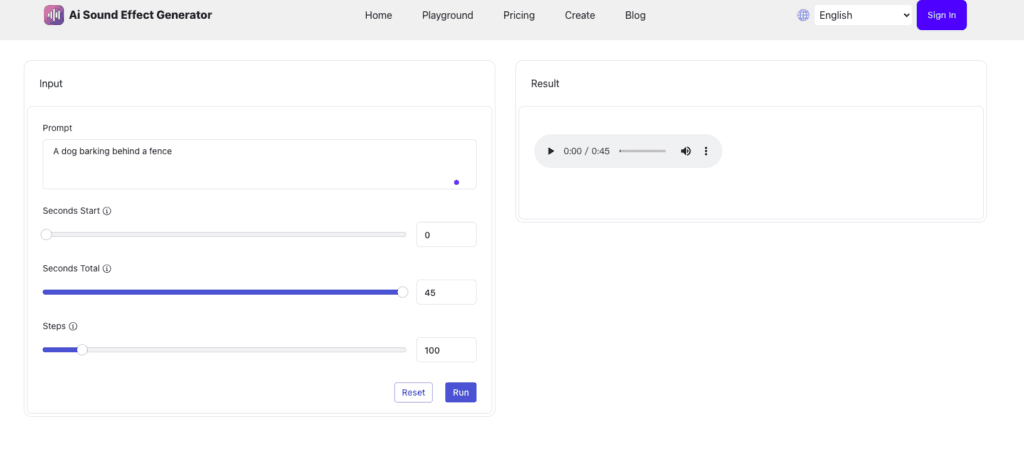
- Duration Control: I noticed a slider that allows you to specify exactly how long you want the sound to be. This is a lifesaver for timing your SFX to a specific video cut.
- High-Fidelity Output: The tool generates audio at a high sample rate (typically 44.1kHz), ensuring the sounds are crisp enough for professional projects.
- Prompt History: Based on my exploration, the dashboard keeps track of your previous generations, which is great if you want to go back and download a variation you liked earlier.
Use Cases of AI Sound Effect Generator
Who is actually using this? Based on community discussions and the tool’s own documentation, here are the top use cases:
- Indie Game Developers: Creating unique UI sounds (clicks, hover effects) or environmental sounds for a fantasy world where “real” recordings don’t exist.
- YouTubers & Streamers: Adding “pop” or “whoosh” sounds to on-screen transitions to keep the audience engaged.
- Podcasters: Creating atmospheric “soundscapes” (e.g., “a busy coffee shop in the year 2099”) to set the mood for their stories.
- Film Students: Handling foley work for short films when they don’t have access to a professional sound stage or high-end microphones.
How To Use AI Sound Effect Generator?
To get started, I first headed to the homepage. The process is surprisingly straightforward—no deep menus or complex settings to get lost in.
Step 1: Enter Your Prompt
In the main text box, I typed in a description. I found that being specific works best. Instead of “car,” I tried “vintage muscle car engine revving in a parking garage.”
Step 2: Adjust the Settings
Next, I used the duration slider to set the length. I recommend starting with 3–5 seconds for most SFX to keep the file size manageable and the sound punchy.
Step 3: Generate and Preview
Click the “Generate” button. It usually takes about 10–30 seconds. Once it’s done, a player appears so you can listen to the result.
Step 4: Download
If you like it, hit the download button to grab the .wav or .mp3 file. If not, you can tweak your prompt (add words like “echo” or “low-pitch”) and try again!
FAQ
1. Are the sounds royalty-free?
Based on my research into AI-generated content and the site’s current structure, the sounds are typically yours to use, but you should always check the “Terms of Service” on the site for the most up-to-date licensing info, especially for commercial projects.
2. How does it compare to ElevenLabs or Stable Audio?
While those are giants in the field, AI Sound Effect Generator is more focused on SFX specifically. It’s often faster and more “to the point” for users who don’t need complex music or voice cloning.
3. Is there a limit to how many sounds I can generate?
Most users on forums like Reddit mention that the site offers a free tier with a limited number of credits, with paid options for power users who need hundreds of sounds a month.
So, what’s the bottom line?
If you’re a creator who is tired of the “stock sound hunt,” AI Sound Effect Generator is a tool you need in your bookmarks. It’s not going to replace a professional sound designer for a Hollywood blockbuster, but for 90% of digital creators, it provides a level of customization and speed that was impossible just two years ago.
It’s simple, it’s fast, and the quality is genuinely impressive.
Have you tried generating your own sounds with AI yet? Share your weirdest prompt results in the comments below!
Visit AiSupersmart.com for more deep dives into the tools changing the way we create.
 Login with Google