
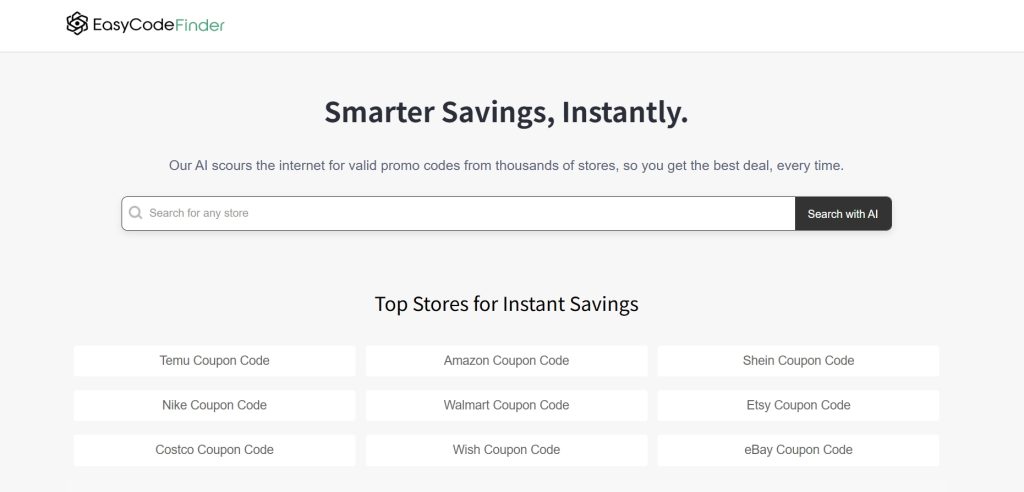

EasyCodeFinder is a next-generation coupon finder powered by artificial intelligence. Instead of just listing static codes, our smart system actively searches the entire web in real-time. It scans major coupon sites, search engines like Google, and even social media feeds to find the most current and valuable deals available for thousands of stores.
Let’s be honest, we’ve all been there. You’re at the checkout page, you see that little “promo code” box, and the hunt begins. You open a dozen tabs, try a bunch of codes that don’t work, and half the time you just give up. It’s a modern-day treasure hunt where the treasure is 15% off. So, when I heard about a new AI tool called EasyCodeFinder that claims to do the heavy lifting for you, my inner tech-savvy friend and deal-hunter had to see if it lived up to the hype.
I’ve spent time digging through their website, checking out what people are saying online, and, of course, running a few searches myself. Here’s the real story.
Key Information
What it is: EasyCodeFinder is an AI-powered search engine designed to find working promo codes and coupons for thousands of online stores.
Best For: Online shoppers who want to quickly find valid discount codes without the hassle of manual searching.
My Key Finding: The most interesting feature, based on my research, is the ability to perform multiple searches to have the AI dig deeper for codes, which can sometimes unearth brand-new, working coupons.
What is EasyCodeFinder?
EasyCodeFinder is a free-to-use website that uses artificial intelligence to scour the internet for active promo codes. Instead of just relying on user submissions or static databases like many other coupon sites, its AI actively searches for deals in real-time. The core problem it’s trying to solve is a familiar one: saving you the time and frustration of sifting through expired or fake coupon codes.
Features of EasyCodeFinder
From my exploration of the site, here are the standout features:
- AI-Powered Search: This is the core of the tool. You type in a store name, and the AI instantly scans various sources, including coupon sites, search engines, and even social media, to find relevant codes.
- Wide Store Coverage: The tool claims to have coupons for a massive range of online stores, from big names like Amazon and Walmart to smaller, niche retailers.
- Instant Code Verification: The AI doesn’t just find codes; it also works to verify them. It uses technology and user feedback to weed out expired ones, which is a huge plus.
- No Sign-Up Required: You can use the full power of the search without creating an account or providing any personal information. This is a big win for privacy and convenience.
Use Cases of EasyCodeFinder
So, who is this tool actually for?
- The Everyday Online Shopper: This is the most obvious one. If you’re buying anything online, from pizza to a new pair of sneakers, a quick search on EasyCodeFinder could save you money.
- The Deal Hunter: For those who love the thrill of finding a great deal, this tool automates the most tedious part of the process, letting you focus on the savings.
- The Budget-Conscious Buyer: If you’re trying to stick to a budget, every little discount helps. This tool makes it easy to consistently save on your online purchases.
I saw a few user testimonials on their site that back this up.One user mentioned saving $30 on a Nike order, while another found a rare discount for a small boutique shop.
How To Use EasyCodeFinder?
Getting started with EasyCodeFinder is incredibly straightforward. Here’s a step-by-step of my experience:
- Navigate to the Homepage: The first thing you see is a clean, simple search bar. No clutter, no pop-ups. It immediately gets to the point.
- Enter a Store Name: I typed in a popular store I was planning to buy from. As soon as I started typing, suggestions appeared, which was a nice touch.
- Let the AI Search: I hit the “Search with AI” button, and within seconds, the tool presented me with a list of potential codes.
- Copy and Paste: Next to each code, there’s a clear “Copy” button. I just clicked it, went to the store’s checkout page, and pasted it in. The site even has a feature that suggests you search again if you don’t find a working code, which I thought was a clever way to encourage a deeper search.
FAQ
I noticed a few common questions popping up in my research and on the EasyCodeFinder site itself. Here are the big ones:
- Is EasyCodeFinder really free?
Yes, it’s completely free to use. There are no subscription fees or hidden costs. - How does it find the codes?
The AI actively scans a wide variety of sources, including major coupon sites, search engines, and even social media feeds to find the most current deals. - Do I need to create an account?
Nope! You can start searching right away without any need to sign up or provide personal information. - What if I don’t find a code on the first try?
The site encourages you to try searching again. Each search can expand the AI’s hunt, potentially uncovering codes it didn’t find in the first pass.
So, what’s the bottom line?
EasyCodeFinder is a simple, effective, and surprisingly fast tool that does exactly what it promises. It takes the frustration out of hunting for promo codes and makes it easy to save money. While it might not find a working code for every single store, every single time, its AI-powered approach and the fact that it’s free and requires no sign-up make it a no-brainer to try before any online purchase. It’s a perfect example of a tool that uses AI to solve a common, everyday problem.
Have you tried EasyCodeFinder? Share your experience in the comments
 Login with Google