
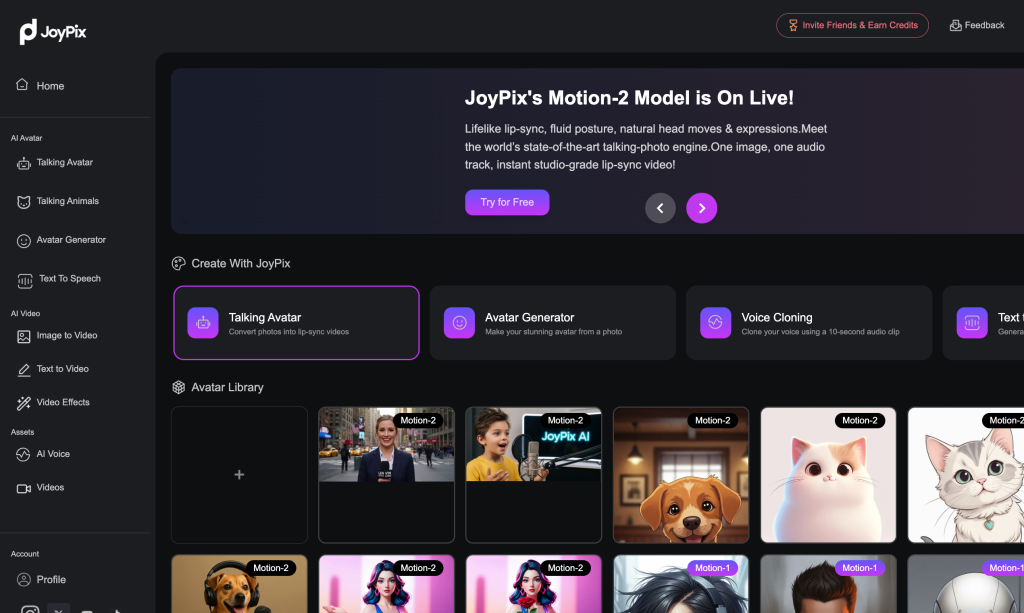

JoyPix AI — All-in-One AI Video Platform
JoyPix AI is a cutting-edge AI video platform for text-to-video and image-to-video creation, empowering creators to generate lifelike talking videos, animated avatars, and multi-character dialogue —no expertise required. Instantly turn a single photo, text, or audio clip into a complete “image/text + voice → video” workflow. Powered by Motion-2, Wan 2.5, Sora, Veo, and Hailuo, JoyPix delivers accurate lip-sync, natural movements, and expressive, studio-quality results in minutes. Perfect for anime, social media content, brand storytelling, marketing campaigns, educational materials, product demos, virtual presentations, and interactive storytelling.
🔥Key Features & Advantages
1/ Talking Avatars
Turn photos into lifelike talking avatars. Supports single or dual characters, as well as humans or animals, with each character delivering natural dialogue. Features precise lip-sync and smooth movements—perfect for interactive conversations, animal videos, or multi-character scenes.
2/ AI Video Generation
Instantly create videos from text or images using top AI video models (Motion-2, Wan 2.5, Sora, Veo, Hailuo, and more). Produce expressive, studio-quality videos in minutes.
3/ Free Voice Cloning
Clone your voice from just a 10-second audio sample—supports multiple languages and emotional tones. Combine with avatars to instantly generate talking videos.
4/ 40+ AI Video Effects
Apply over 40 animation styles—including anime, 3D cartoon, watercolor, and oil painting—with one click.
5/ User-Friendly Workflow
Simplified steps—upload photo or text, choose style, add voice, and generate video. Integrates the complete “photo/text + voice → talking video” workflow in one platform, saving time and enabling you to create unique, engaging content for personal or brand projects.
🚀 Unlock your creative potential with JoyPix AI— earn free credits daily to keep creating and crafting unique, imaginative AI content.
Key Points :
Related Posts
What Exactly Is JoyPix AI?
JoyPix is a browser-based AI platform. You don’t need to download a heavy .exe file or know how to code in Python. It’s built for regular people who want to click a button and see magic happen.
While it offers a few features, its main claim to fame is Face Swapping.
It takes the facial features from Photo A (your selfie) and maps them onto Photo B (a movie scene, a model, or a painting). Unlike old-school Photoshop where you had to manually cut and paste, JoyPix uses deep learning to blend skin tones and lighting automatically.
The “Gotchas”: Credits and Costs
This is where most people get frustrated. JoyPix is not an infinite free fountain.
- The Credit System: Every time you hit “Generate,” you burn credits.
- Free Tier: You typically get a daily login bonus or a starter set. This is enough for 2-3 images to test the water.
- The Paywall: Once those credits are gone, you have to buy a pack.
Is it worth paying for?
If you are making a funny birthday card for a friend? No, just use the free credits.
If you run a meme page or need consistent assets for a presentation? Yes, the paid tier is generally cheaper than hiring a designer.
3 Tips to Stop Your Swaps From Looking “Uncanny”
After burning through about 50 credits, I found the formula for a perfect swap.
- Resolution Matters: Do not use low-res screenshots. If your source image is blurry, the AI cannot invent details. It will just smudge a blurry face onto a sharp body.
- Forehead Visibility: This sounds weird, but trust me. If your hair covers your forehead in the “Source” photo, the AI struggles to map your hairline onto the “Target.” Pull your hair back for the source selfie.
- Expression Matching: Don’t use a smiling selfie if the target photo is a serious soldier. The AI tries to warp the lips, and it looks terrifying. Match the vibe.
A Note on Privacy (Please Read This)
I act as your friend, so I have to give you the safety talk.
When you upload your face to any AI tool, you are sending biometric data to a server. JoyPix has standard privacy policies, but my rule of thumb is: Never upload photos of children, and never upload sensitive or compromising photos.
Use these tools for public figures, yourself, or stock photos. Keep it fun, keep it safe.
So, what’s the bottom line?
JoyPix AI is one of the more accessible, user-friendly tools on the market right now. It cuts through the complexity of running your own Stable Diffusion server and just lets you have fun.
My Final Verdict:
It is Excellent for quick, funny face swaps and stylized avatars.
It is Average for complex photo manipulation where angles don’t match.
Go give it a try with the free credits first. Don’t pull out your credit card until you’ve successfully swapped at least one photo that makes you laugh.
Have you tried JoyPix or other swappers like Reface? Did you get a masterpiece or a monster? Drop a comment below—I’d love to see what you made!
 Login with Google