
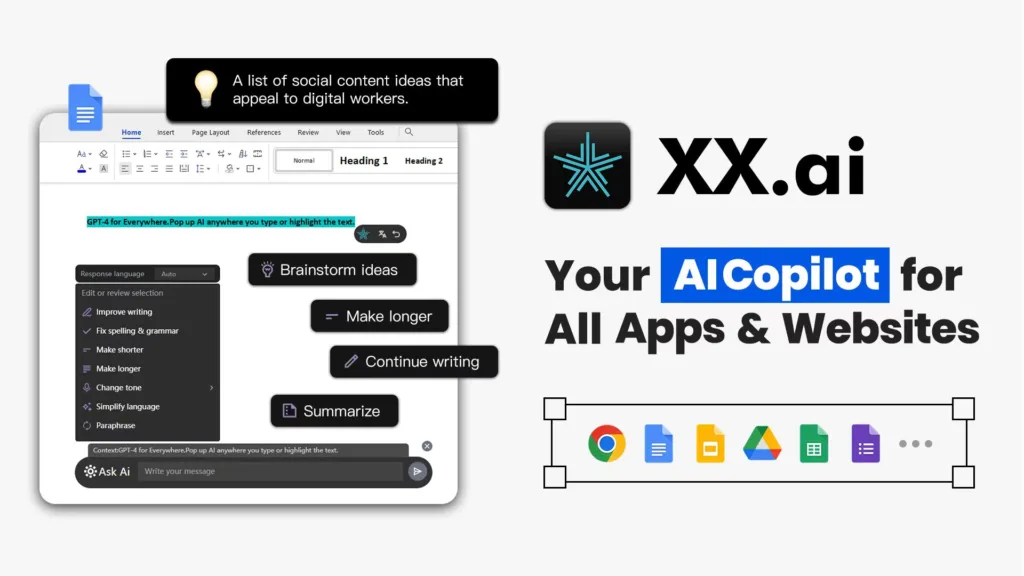

XX.AI — Your Premier Desktop AI Copilot
Imagine the convenience of having an AI writing partner ready to assist with any text task anytime, anywhere on the web. XX.AI, powered by advanced models like GPT-4, Claude 3, and DALL-E 3, integrates seamlessly into all apps and websites, eliminating the need for manual copy-pasting. This tool epitomizes innovation, offering users a frictionless writing experience. From drafting emails to generating images, XX.AI propels your ideas from concept to completion.
Try Now
Experience the benefits of XX.AI with a free trial.
Key Features:
· Flexibility: Functions universally, not just in text but across files and images.
· Innovation: Dual AI models, GPT-4 and Claude 3, for smart adaptability in multimodal tasks.
· Availability: Compatible with Windows & macOS, works across all apps and websites.
How to Use:
· Activate AI with Shift + A to assist with text, files, or images.
· Get AI Response by pressing Enter for immediate feedback or processing.
· Direct Interaction with Ctrl + Enter to integrate AI responses or processed media into active software.
Pricing:
· Free Trial: Experience the benefits of XX.AI with a free trial.
Related Posts
· Pro Plan: $9.99 per month with 2500 credits.
· Pro+ Plan: $14.99 per month with 6000 credits.
· Unlimited Plan: $39 per month for unlimited access.
Use Cases:
· Content creation for blogs, social media, and marketing materials.
· Assisting students in understanding complex concepts and improving writing skills.
· Streamlining email writing for daily business communications.
· Supporting professionals and marketers in creating effective copy and visual content.
Community & Support:
Join our Discord or Telegram community for learning and support. For direct assistance, contact us via email at [email protected].
Article Title: XXAI Review: The “All-in-One” Desktop Copilot That Brings GPT-4 & Claude Anywhere
Introduction
If you are anything like me, your browser tabs are a mess. You have ChatGPT open in one, Claude in another, and maybe a translation tool in a third. It’s a constant toggle-dance that kills your flow.
That’s why I was intrigued when I came across XXAI (found at hixx.ai). It promises to stop the “tab juggling” by putting all those powerful AI models into a single desktop interface that floats on top of whatever app you’re using.
I spent the last few days digging into this tool—installing it, testing its features, and reading through user feedback on Reddit—to see if it’s actually useful or just another “wrapper” app.
Here is everything you need to know.
Key Information
- What it is: A desktop application (Mac & Windows) that integrates top AI models (GPT-4o, Claude 3.5, DALL-E 3) into a single floating interface.
- Best For: Writers, developers, and multitasking professionals who want instant AI help without switching browser tabs.
- My Key Finding: Its “text selection” feature is the game changer. You can highlight text in any app (like Word or Slack), and XXAI pops up instantly to rewrite or summarize it.
What is XXAI?
XXAI is an AI “copilot” designed specifically for your desktop. Unlike ChatGPT, which lives in a web browser, XXAI installs directly onto your computer (Windows or macOS).
The core problem it solves is friction. Instead of stopping your work to open a website, copy-paste text, and wait for an answer, XXAI brings the AI to you. It acts as a bridge to the world’s best AI models, allowing you to use GPT-4o for creative writing or Claude 3.5 Sonnet for coding, all within the same little window.
Important Note: Do not confuse this with “xAI,” which is Elon Musk’s company (Grok). XXAI is a completely separate productivity tool.
Features of XXAI
After testing the tool and cross-referencing with their official documentation, here are the standout features:
- The “Anywhere” Copilot: This is the flagship feature. Once installed, XXAI runs in the background. You can trigger it with a shortcut (usually Shift + A) to bring up a chat bar over any application—whether you are coding in VS Code or writing an email in Outlook.
- Multi-Model Support: You aren’t locked into one AI. A simple dropdown menu lets you switch between GPT-4o, Claude 3.5, and others. This is brilliant for power users who know that Claude is better for coding but GPT-4 is better for creative brainstorming.
- Instant Text Polish: If you highlight text on your screen, XXAI detects it and offers a small popup menu. You can click to “Rewrite,” “Summarize,” “Translate,” or “Explain” the selected text without typing a single prompt.
- Vision & Image Generation: It integrates DALL-E 3 for generating images from text. It also has vision capabilities, meaning you can take a screenshot of a chart or error message, and the AI will analyze it for you.
- PDF & Document Chat: You can upload long documents (PDFs, docs) directly into the chat window. The AI reads the file and lets you ask questions about specific details, saving you from reading the whole thing manually.
Use Cases of XXAI
Who is this actually for? Based on my research, three types of people get the most value here:
- The “Email Fatigue” Professional:
- Scenario: You have to reply to 50 emails.
- XXAI Fix: Highlight the incoming email text, click “Reply,” and choose a tone (e.g., “Professional” or “Friendly”). XXAI drafts the response directly in your mail app.
- The Coder/Developer:
- Scenario: You are stuck on a bug in your code editor.
- XXAI Fix: Instead of Alt-Tabbing to a browser, you hit Shift + A, paste the error snippet, select the Claude 3.5 model (widely considered best for coding), and get a fix overlaid right next to your code.
- The Content Creator:
- Scenario: You are writing a blog post in Google Docs and can’t find the right word.
- XXAI Fix: You highlight your rough sentence and use the “Expand” or “Fix Grammar” tools to instantly polish your prose.
How To Use XXAI?
Getting started is easier than most complex software. Here is the workflow I followed:
Step 1: Install the Desktop App
I went to hixx.ai and downloaded the client for my OS. The installation was standard—no complex configuration required.
Step 2: Create an Account
You will need to sign up to sync your usage. They offer a free tier with daily credits, which is great for testing the waters.
Step 3: Master the Magic Shortcut
This is the most important step.
- Press Shift + A (or the command key on Mac) to toggle the AI search bar.
Step 4: Switch Models
In the chat interface, look for the model name in the corner. Click it to swap engines.
Step 5: Try the “Highlight” Trick
Go to a website, highlight a paragraph, and wait for the tiny XXAI icon to appear. Click it to see the quick actions menu.
FAQ
Q: Can XXAI be used for free?
Yes! You don’t have to commit to a paid plan immediately. XXAI offers a generous free tier that gives you 100 free credits every single day. This is plenty of bandwidth to test the features and see how it fits into your daily workflow without spending a dime.
Q: If I subscribe to XXAI, do I still need to pay for ChatGPT Plus or Claude?
Nope, and this is where it saves you money. Because XXAI integrates the API services of both GPT-4 and Claude 3, a single subscription here effectively replaces the need to hold separate subscriptions for those other tools. You get the best of both worlds in one monthly bill.
Q: How does XXAI compare to specific tools like Notion AI or Grammarly?
The main difference is versatility. Notion AI is trapped inside Notion, and Grammarly is primarily focused on spell-checking. XXAI works universally across every application on your computer. It also offers a much broader feature set—including image generation and complex problem solving—often at a more competitive price point than buying niche tools.
Q: Does XXAI support multiple languages?
Absolutely. It is built for global accessibility, supporting over 200 languages. Whether you are translating a document or writing an email in a foreign language, XXAI handles the context and grammar fluently.
So, what’s the bottom line?
XXAI is essentially a “power tool” for people who live in their web browsers and text editors. It doesn’t invent new AI models; it just makes the existing ones (GPT-4 and Claude) much faster to access.
If you are tired of copy-pasting text back and forth between tabs, XXAI is a massive quality-of-life upgrade. It creates a seamless flow where AI feels like a built-in part of your computer rather than a separate destination.
Have you tried XXAI? Share your experience in the comments!
 Login with Google