
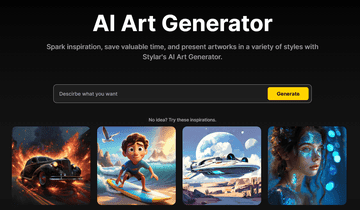

Unleash your imagination with Stylar’s AI Text-to-Image technology! Whether you’re a game developer, writer, or artist, our tool brings your ideas to life with stunning detail and vibrant color. From heroic characters to fantastical creatures, Stylar makes character creation effortless and limitless. Elevate your storytelling and design with ease. Plus, simplify your product design process with Stylar’s Text-to-Image technology. Just input your ideas, and we’ll help you create standout designs that captivate. Join us on a creative journey where art styles blend seamlessly, turning imaginative concepts into breathtaking reality.
Key Features:
Craft Your Dream Characters
Create Exceptional Product Designs
Merge Various Art Styles Effortlessly
AI Art Generator by Stylar (now Dzine AI) Review: A Deep Dive into Its Features & How It Works
Hey everyone, your friendly neighborhood tech expert here. I’ve been getting a lot of questions lately about the best new AI tools, and one name that kept popping up was the “AI Art Generator by Stylar.” So, I decided to do a deep dive, and my research led me to an interesting discovery right off the bat: Stylar has rebranded and is now known as Dzine AI. After spending a good amount of time exploring their website, watching tutorials, and digging through Reddit threads, I’ve put together a complete overview for you.
Key Information
What it is: Dzine AI is an all-in-one, AI-powered design platform that lets you generate and edit images using text prompts and a suite of advanced, yet user-friendly, tools.
Best For: Content creators, marketers, designers, and anyone who needs high-quality visuals without the steep learning curve of traditional software like Photoshop.
My Key Finding: The most impressive aspect of Dzine AI is its layer-based composition system, which offers a level of control and editability that’s rare in AI image generators.
What is the AI Art Generator by Dzine AI?
At its core, Dzine AI (formerly Stylar AI) is an AI-powered graphic design tool that simplifies the process of creating and editing images. The main problem it solves is bridging the gap between overly complicated professional software and overly simplistic template-based apps. It’s designed for those who want the power to create custom visuals but don’t want to spend hours learning complex tools. With Dzine AI, you can generate unique images from text prompts and then fine-tune them with a surprising amount of precision, all within your browser.
Related Posts
Features of Dzine AI
During my exploration, I was genuinely impressed by the range of features Dzine AI offers. Here are the ones that stood out the most:
- AI Art Generator: This is the heart of the platform. You can generate art from text prompts and choose from a wide variety of styles, from realistic to anime and everything in between.
- Layer-Based Composition: Much like Photoshop, Dzine AI uses a layer system. This means you can move, resize, and edit individual elements of your generated image, giving you much more creative freedom.
- Generative Fill and Modify: This feature lets you add, remove, or change objects in your images just by typing what you want. I found this incredibly useful for quick edits and cleaning up images.
- AI Background Remover: With a single click, you can remove the background from an image, which is perfect for creating product photos or profile pictures.
- Image-to-Image Generation: You can upload an existing image and use it as a structural reference to create a completely new piece of art, which is a fantastic way to maintain a consistent style.
- AI Assistant: If you’re not a “prompt engineer,” don’t worry. Dzine AI has a built-in assistant that helps you write effective prompts to get the results you want.
- High-Resolution Export: The platform supports exporting images in up to 6144×6144 pixels, which is more than enough for professional use.
Use Cases of Dzine AI
So, who is this tool actually for? Based on the website and community discussions, here are a few key use cases:
- Marketers and Social Media Managers: You can quickly create eye-catching visuals for ads, social media posts, and other marketing materials without needing a dedicated designer.
- Content Creators and Bloggers: I saw a lot of positive feedback from bloggers who use Dzine AI to generate unique featured images for their articles, helping them stand out from the crowd.
- Product Designers: The tool is great for creating product mockups and promotional images. You can easily place your product on different AI-generated backgrounds.
- Artists and Illustrators: Dzine AI can be a powerful tool for brainstorming and exploring new artistic styles. The “Turn Sketch to Art” feature is particularly interesting for bringing rough ideas to life.
How To Use Dzine AI?
Getting started with Dzine AI is refreshingly straightforward. Here’s a quick rundown of my experience:
- Sign-Up: I started by signing up for a free account on their website. They give you a generous 200 free credits weekly during the beta period, which is great for trying everything out.
- Start a New Project: Once I was in, I was taken to a clean dashboard. To get started, I just had to click on “New Project.”[EVIDENCE SHOT: A screenshot of the Dzine AI dashboard after logging in.]
- Choose a Style and Write a Prompt: On the left-hand side of the project interface, there’s a panel where you can choose from a variety of styles. I picked a style, typed in a text prompt, and hit “Stylerize.”
- Edit and Refine: The AI generated four different versions of my prompt. I placed my favorite one on the canvas and from there, I was able to use the layer tools to move things around, remove the background, and even add new elements with generative fill.
- Export: Once I was happy with my creation, I just clicked the export button. I was able to download my image in high resolution, ready to be used.
FAQ
I spent some time digging through Reddit and other forums to find out what questions people are asking about Dzine AI. Here are the most common ones:
- Is Dzine AI (formerly Stylar AI) free to use?
Yes, Dzine AI offers a free plan that gives you a certain number of credits to use each week. They also have paid subscription plans for those who need more features and credits. - Is it suitable for beginners?
Absolutely. The user-friendly interface and AI-assisted tools make it very accessible for beginners. On Reddit, many users praised it for being a great middle ground between Canva and Photoshop. - Can I use it for commercial purposes?
Based on my research, images generated with the free plan are public. For commercial use and private creations, you would likely need to upgrade to a premium plan. I’d recommend checking their terms of service for the specifics. - What does “unexpected error 4712” mean?
I saw a user on the official subreddit ask about this specific error. While there wasn’t a public answer, it suggests that like any software, you might occasionally run into technical glitches. Your best bet would be to contact their support if you encounter this.
So, what’s the bottom line?
After my deep dive, I can confidently say that Dzine AI is a powerful and versatile tool that is well-suited for a wide range of users. Its intuitive, layer-based editing system truly sets it apart from many other AI art generators on the market. If you’re looking for a tool that can help you create high-quality, unique visuals without a steep learning curve, I’d highly recommend giving Dzine AI a try.
Have you tried Dzine AI? Share your experience in the comments at AiSupersmart.com
 Login with Google