
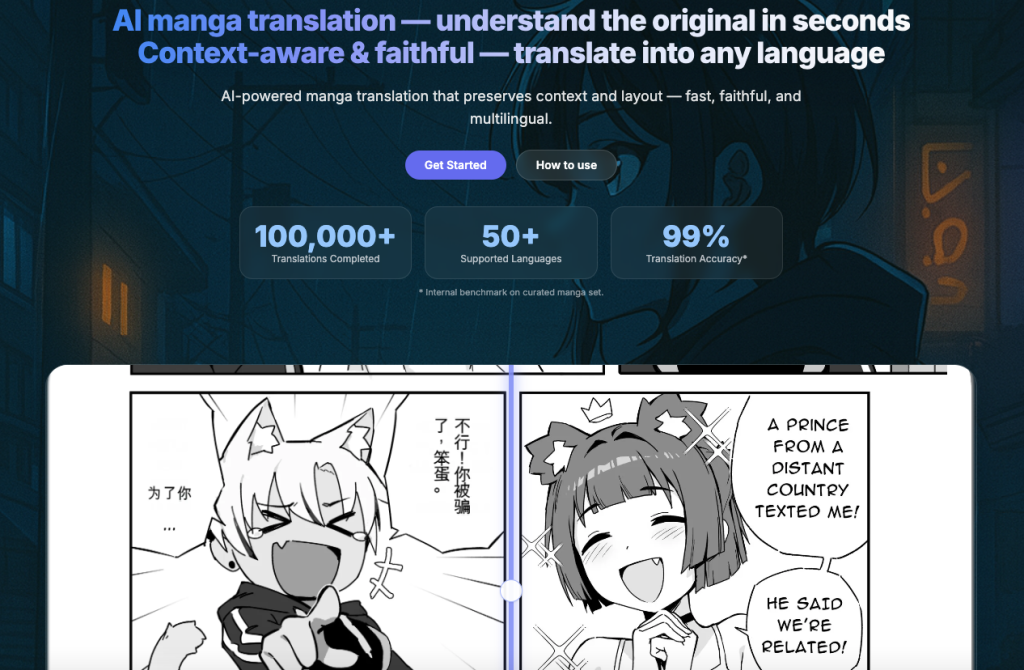

AI Manga Translation is a browser-based OCR + translation tool built specifically for manga and doujin. It accurately recognizes vertical and horizontal text, handles line breaks and ruby/furigana, and translates into multiple languages. For production speed, it supports true batch processing of whole chapters/books and performs layout-preserving auto-typesetting so pages keep their original look with minimal manual editing. A review screen lets you proof and tweak results before export. Works on any OS and modern browser, supports high-resolution images and common manga page sizes, and is friendly for both solo scanlators and teams. Freemium model with a free tier and optional Pro features. We respect copyright and process your files only for your tasks.
Article Title: AI Manga Translate Review: Is This the Scanlation Tool We’ve Been Waiting For?
Introduction
If you’re anything like me, you’ve probably stared at a raw manga panel, frantically switching between Google Lens and a dictionary, trying to figure out if the protagonist is confessing their love or just ordering ramen. It’s frustrating.
I recently stumbled upon AI Manga Translate (aimangatranslate.com), a tool that promises to fix this by not just translating text, but actually cleaning and typesetting it directly onto the page. But does it actually work, or is it just another clunky overlay? I dug deep into the software, the docs, and the dev logs to find out.
Key Information
- What it is: A browser extension and web platform that uses AI to translate manga/comics by removing original text and repainting the background with English (or other languages).
- Best For: Manga readers who want to read “raws” directly in the browser, and scanlation teams looking to speed up the cleaning/typesetting process.
- My Key Finding: Unlike basic translators, this tool uses “Context-Aware” translation, meaning it remembers character names and plot points from previous pages to avoid confusing translations.
What is AI Manga Translate?
At its core, AI Manga Translate is a dual-purpose tool designed to break down the language barrier for comic readers.
Based on my analysis of their official documentation, it solves two massive problems:
- For Readers: It allows you to read manga on Japanese, Korean, or Chinese websites by translating the text bubbles in real-time without destroying the artwork.
- For Creators/Scanlators: It offers a “production pipeline.” Instead of manually erasing text (cleaning) and pasting in new text (typesetting), the AI handles the heavy lifting, allowing you to edit the results.
It claims to go beyond simple text-swapping by using a “hybrid OCR” (Optical Character Recognition) engine that can actually read those tricky vertical Japanese texts and handwritten sound effects that usually confuse standard translators.
Related Posts
Features of AI Manga Translate
I spent time combing through their feature logs and “how it works” sections. Here are the standout features that make this tool interesting:
- In-Page Browser Extension: This is the feature most of us will use. You install the Chrome extension, go to a site reading raw manga, and click a button. The tool overlays the translated text directly over the original speech bubbles.
- Smart Background Removal (In-painting): Bolded because this is huge. The tool doesn’t just put a white box over the Japanese text. It attempts to repaint the background art behind the text, making the translation look like it belongs there.
- Context-Aware Translation: I found this fascinating—the AI analyzes the “page-level context.” It looks at who is speaking and what happened in previous panels to ensure the translation flows naturally, rather than translating every bubble in isolation.
- Vector-Aware Typesetting: Instead of using a generic Arial font, the tool measures the bubble curvature and size to fit the translated text perfectly inside, respecting the original layout.
- Custom Glossaries: If you’re reading a fantasy series with specific spell names, you can “teach” the AI those terms so it doesn’t mistranslate them every time.
Use Cases of AI Manga Translate
Who is this actually for? Based on my research, there are three main groups:
- The Impatient Fan: You follow a weekly series in Japan and can’t wait for the English release. You can use the extension to get a readable version immediately on the publisher’s free web viewer.
- Language Learners: You can use it to double-check your own understanding. Since the tool supports multiple languages, you could even translate English comics into Spanish or Japanese to study.
- Scanlation Groups (Cleaners/Typesetters): This is a heavy-duty use case. Groups can use the batch processing feature to upload raw images, have the AI do a “rough draft” of the cleaning and translation, and then manually polish it. It turns a 5-hour job into a 30-minute edit session.
How To Use AI Manga Translate?
Getting started is surprisingly straightforward. I mapped out the process for the browser extension, as that’s the most common entry point.
Step 1: Get the Extension
First, I went to their website (aimangatranslate.com) and navigated to the install section for the Chrome Web Store.
Step 2: Create an Account (for Credits)
To use the higher-quality models, you usually need to sign in.
Step 3: Navigate to a Manga Site
I opened a raw manga page (e.g., a Japanese webcomic site). You’ll see the extension icon light up.
Step 4: Configure and Translate
Click the extension icon. You can select:
- Source Language: (e.g., Japanese)
- Target Language: (e.g., English)
- Mode: Select “Overlay” to keep the original page intact.
Hit the big “Translate” button.
Step 5: Read
Wait a few seconds (latency depends on the server load), and the text bubbles will transform into English.
FAQ
Based on the official support docs and common user questions, here is everything you need to know before diving in.
Q: Can I really use this for free?
Yes, but it operates on a credit system. The tool provides a free weekly quota designed for light use. If you’re planning to binge-read a massive series, you might run out and need to upgrade to a paid plan. One cool detail I noted is that paid credits roll over within the billing cycle, so you don’t lose what you don’t use immediately.
Q: Which languages are supported?
They cover a wide range. The most popular pairs are English, Japanese (JPN), Simplified/Traditional Chinese (CHS/CHT), and Korean (KOR). However, they also support major European and Southeast Asian languages. You can actually switch the specific AI model per task to better match the language style you need.
Q: Can I edit the text if the translation is wrong?
Not currently. While they have plans to add in-browser editing soon, you can’t manually tweak the text inside the bubble right now. If a translation feels off, your best bet is to rerun the page using a different target language or model to compare the results.
Q: How do I translate a full PDF file?
This feature is surprisingly robust. You just drag your PDF file into the uploader. The system processes the pages in parallel (so it’s faster) and then merges them back into a single file automatically, keeping the correct page order and size. Note that very large PDFs might be “chunked” to keep the server stable, but it handles the heavy lifting for you.
Q: Is it hard to cancel if I subscribe?
Thankfully, no. There are no hidden hoops to jump through; you can cancel your plan at any time directly through your account profile.
So, what’s the bottom line?
AI Manga Translate is a significant step up from the “point phone at screen” method. While no AI is perfect—and you will occasionally get some clunky phrasing—the combination of in-painting technology and context awareness makes it one of the most polished tools I’ve researched in this niche. It preserves the feel of the manga, which is exactly what we want.
Have you tried AI Manga Translate? Did it handle your favorite obscure manga correctly, or did it make a mess of the artwork? Share your experience in the comments below!
 Login with Google