
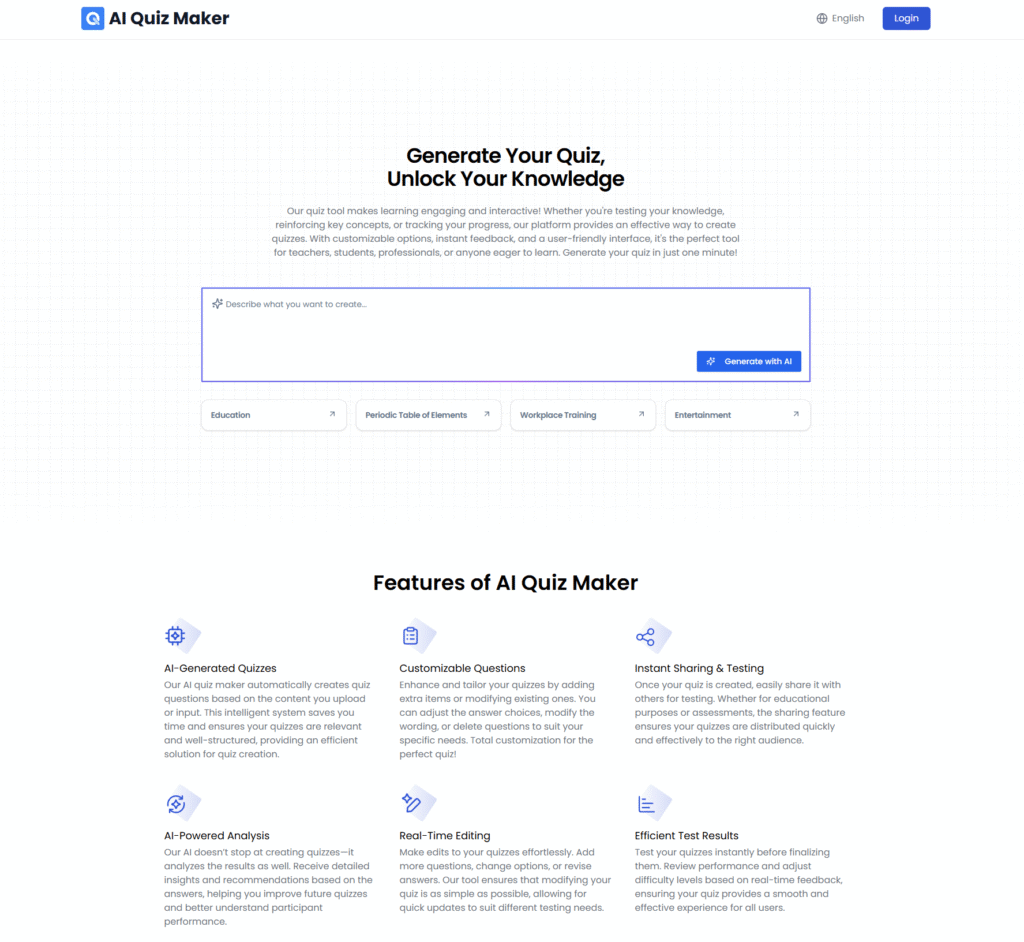

The AI Quiz Generator is an online tool that automatically creates custom quiz questions. Users can quickly generate multiple-choice, fill-in-the-blank, and other question types, improving efficiency and quiz quality. The tool ensures questions are engaging and relevant for assessing key knowledge areas.
With easy customization options, users can add, remove, or edit questions as needed. Once tailored, quizzes can be saved and shared for teaching, training, or assessments.
This AI-powered tool simplifies quiz creation and distribution, helping educators, trainers, and managers create high-quality, customized quizzes for more efficient learning and evaluation.
AI Quiz Generator Review: A Deep Dive into Its Features & How It Works
If you’ve ever had to write a quiz from scratch—whether for a class you’re teaching, a corporate training session, or just a fun trivia night—you know the struggle. Staring at a blank page, trying to come up with the third wrong answer for a multiple-choice question? It’s draining.
That’s why I’ve been testing out AI tools that claim to do the heavy lifting for you. Today, I’m digging into AI Quiz Generator (found at aiquizmaker.net). I spent the afternoon feeding it different types of content—from dry history articles to technical PDFs—to see if it actually works or if it just spits out nonsense.
Here is everything I learned.
Key Information
What it is: An online tool that uses AI to instantly convert uploaded files (like Word docs) or pasted text into fully functional quizzes with multiple question types.
Best For: Teachers who need quick assessments, students using “active recall” to study, and HR managers creating training checks.
Related Posts
My Key Finding: The most impressive feature isn’t just the question generation—it’s the Smart Answer Explanations. The tool doesn’t just tell you the right answer; it generates a detailed explanation of why it’s correct, which is a huge bonus for learning.
What is AI Quiz Generator?
At its core, AI Quiz Generator is a productivity engine designed to eliminate the manual labor of assessment creation. Instead of writing questions one by one, you provide the source material, and the AI analyzes the text to identify key concepts and facts.
According to their official site, the tool creates “customized, relevant quizzes with minimal effort.” It solves the “Blank Page Problem” by instantly drafting questions for you. While many tools do this, this specific platform focuses heavily on being a lightweight, browser-based solution that doesn’t require complex software installation.
Features of AI Quiz Generator
After poking around the dashboard and testing different inputs, here are the standout features I found:
- Multi-Format Input: This is the big one. You aren’t limited to just typing in a topic. You can upload files (specifically Word documents and text files) or paste a giant block of text directly into the tool. I found this incredibly useful for converting lecture notes into a practice test.
- Smart Answer Explanations: As I mentioned earlier, this is a game-changer. When the AI generates a question, it also provides a context-rich explanation for the correct answer. This transforms the quiz from a simple test into a study guide.
- Real-Time Editing: The AI isn’t perfect (no AI is), but the tool anticipates this. It has a built-in editor that lets you modify the questions, change the options, or delete irrelevant ones immediately after they are generated. You have full control before you hit “Share.”
- Diverse Question Types: It doesn’t just stick to standard Multiple Choice. During my research, I found it supports True/False, Fill-in-the-blank, and other formats to keep the quiz engaging.
- Instant Sharing & Analysis: Once your quiz is ready, you get a link to share it. Even better, the tool includes an “AI-Powered Analysis” feature that offers insights into the results, helping you understand where participants might be struggling.
- Multi-Language Support: I noticed a language dropdown in the menu bar supporting English, French, German, Spanish, and several others. If you are a language teacher or work in a multilingual team, this is a massive plus.
Use Cases of AI Quiz Generator
Who is this actually for? Based on the features, here are the three best use cases:
- Educators & Tutors:
- The Scenario: You have a 10-page PDF on “The French Revolution” for your history class.
- The Fix: Upload the PDF, and in seconds, you have a 15-question quiz to check reading comprehension without typing a single word.
- Corporate Trainers:
- The Scenario: You just updated the “Company Safety Policy” document and need to ensure employees actually read it.
- The Fix: Paste the policy text into the generator to create a quick compliance check that employees can take on their phones.
- Self-Learners (Students):
- The Scenario: You are studying for a biology final.
- The Fix: Paste your study notes into the tool to create a practice exam. The “Smart Explanations” help you learn while you test yourself.
How To Use AI Quiz Generator?
The interface is refreshingly simple. There are no complex dashboards to navigate. Here is exactly how I went from “blank screen” to “finished quiz”:
Step 1: Access the Tool
I navigated to the homepage. There is no heavy software to download; it all happens in the browser.
Step 2: Upload or Input Content
I saw a clear area to either upload a file or paste text. For my test, I pasted a short article about “Photosynthesis.”
Step 3: Generate Questions
I clicked the “Create a Quiz Now” (or “Generate with AI”) button. The system took a few moments to process the text.
Step 4: Review and Edit
The tool presented me with a list of generated questions. I noticed one question was a bit too easy, so I used the Real-Time Editing feature to tweak the wording and make the “wrong” answers a bit trickier.
Step 5: Test and Share
Once I was happy, I finalized the quiz. I was given a link that I could copy and send to a friend to test out.
FAQ
I scoured the site and looked at common questions regarding similar tools to answer what you’re likely wondering:
1. Is it free to use?
At the time of my research (early 2025), the tool does not display a complex enterprise pricing page on the main menu, suggesting a free-to-use or accessible model for basic features. However, always check for “Upgrade” buttons as these tools often add premium tiers later.
2. Can I upload a PDF?
The site explicitly mentions Word documents and text files. While some users of similar tools expect PDF support, you may need to copy-paste the text from your PDF if the direct upload feature is picky about formats.
3. Can I use this on my phone?
Yes! Since it is a web-based tool, you can access the site and generate (or take) quizzes directly from a mobile browser.
4. How accurate are the questions?
The questions are generally very relevant because they are pulled directly from your text. However, AI can sometimes misinterpret nuance, so I always recommend spending 2 minutes reviewing the questions before sending them out.
So, what’s the bottom line?
AI Quiz Generator (aiquizmaker.net) is a solid, no-nonsense utility for anyone who needs to create assessments fast. It strips away the complexity of traditional learning management systems and focuses purely on speed and ease of use. If you are a teacher drowning in grading or a student trying to study smarter, this is definitely worth a bookmark.
Have you tried AI Quiz Generator? did it save you time, or did you find the questions needed a lot of editing? Share your experience in the comments!
 Login with Google