

## Inspiration
The inspiration for AI Response Generator came from observing the daily communication challenges faced by professionals. Many people spend hours crafting appropriate responses to emails, customer inquiries, and social media interactions. This time-consuming process often leads to communication bottlenecks, especially for those handling large volumes of messages. I believed AI could transform this experience by generating high-quality, contextually appropriate responses without sacrificing personalization.
## What it does
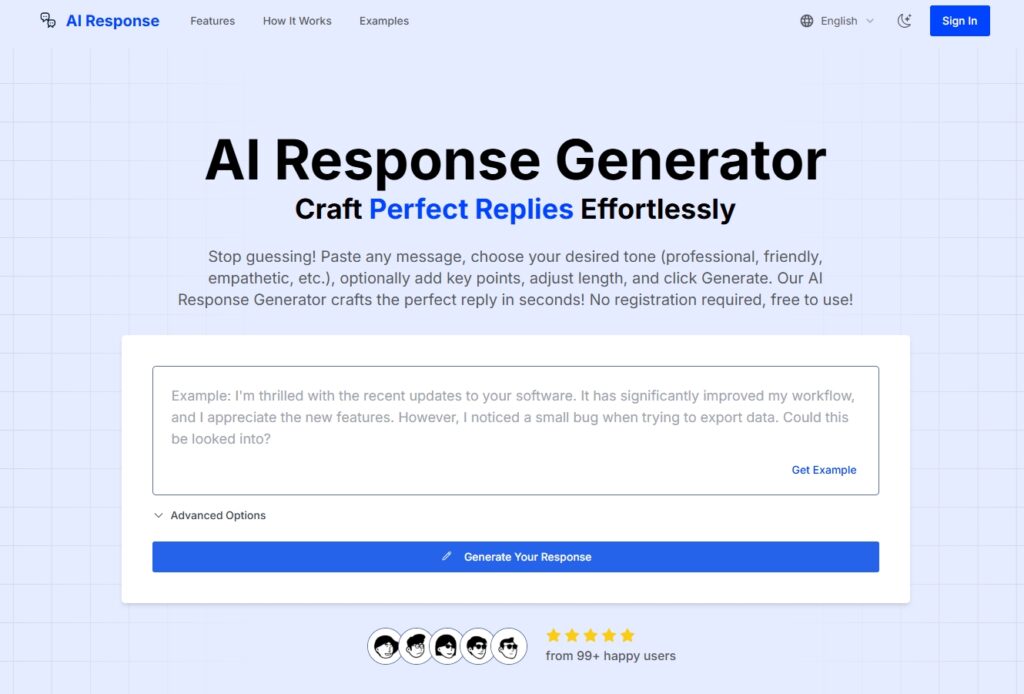
AI Response Generator is an intuitive tool that creates tailored, professional responses based on original messages. Users simply:
1. Paste the message they need to respond to
2. Select a desired tone (professional, friendly, empathetic, etc.)
3. Add key points they want to address (optional)
4. Adjust response length
5. Choose their preferred language
6. Click generate
Within seconds, the system produces a well-structured response with the appropriate tone that incorporates specified key points. Users can use the response as-is or make minor adjustments. The tool is completely free to use with no registration required.
## How I built it
I built this project using a modern technology stack focused on performance and scalability:
– **Frontend Framework**: Next.js and React for a responsive user interface
– **Styling System**: Tailwind CSS with Shadcn UI components for a clean, consistent interface
– **State Management**: React Context for application state
– **AI Integration**: Optimized API calls to advanced language models
– **Internationalization**: next-intl for multilingual support
– **Notification System**: Sonner for user-friendly feedback
Related Posts
The development followed an iterative approach, starting with core functionality and gradually adding more advanced features like multilingual support and customizable tone options.
## Challenges I ran into
Several notable challenges emerged during development:
1. **Prompt Engineering Optimization** – Designing prompt structures
AI Response Generator Review: Is This the Secret to Writing Perfect Replies?
Let’s be real—we’ve all stared at a blinking cursor, paralyzing dread washing over us as we try to figure out how to reply to a vague email from a boss or a tricky text from a friend. I’ve certainly been there.
That’s why when I stumbled upon AI Response Generator (https://airesponse.mom/), I was immediately intrigued. A tool that promises to handle the mental heavy lifting of communication? Sign me up.
I spent the last few days digging into this tool—testing its limits, playing with its tones, and seeing if it actually delivers on its promises. I wanted to see if this was just another generic AI wrapper or a genuine productivity hack. Here is my deep dive.
Key Information
| Feature | Details |
| What it is | A free, no-login AI tool that instantly drafts replies to emails, texts, and comments based on your input. |
| Best For | Freelancers, Customer Support agents, and anyone with “reply anxiety.” |
| My Key Finding | The “Key Points” feature is the MVP here—it prevents the AI from rambling and ensures your actual message gets across. |
What is AI Response Generator?
Simply put, AI Response Generator is a web-based utility designed to transform your rough thoughts or the message you received into a polished, ready-to-send reply.
Unlike massive platforms like ChatGPT where you have to engineer a complex prompt (“Act as a professional marketer and reply to this…”), this tool is purpose-built for one thing: Replies. You paste the message you received, tell it how you want to sound, and it does the rest.
The creators position it as a solution for “writer’s block” in communication, claiming it helps professionals save hours on drafting emails.
Features of AI Response Generator
I explored the dashboard thoroughly, and while the interface is simple, it packs a few clever punches. Here’s what stood out:
- No Registration Required: This is arguably its best feature. I didn’t have to hand over my email or create a password. I just went to the URL and started typing. It’s completely friction-free.
- Tone Customization: You aren’t stuck with one “AI voice.” I found options for Professional, Friendly, Empathetic, Humorous, Formal, and more. This is crucial because you wouldn’t reply to your grandmother the same way you reply to a client.
- Key Points Integration: This feature lets you steer the ship. Instead of letting the AI guess what you want to say, you can bullet-point specific info (e.g., “deny the refund,” “offer a discount instead,” “ask for a meeting Tuesday”). The AI then weaves these points into the final text naturally.
- Adjustable Response Length: A simple slider lets you dictate if you want a quick one-liner or a detailed explanation. I found this incredibly useful for switching between SMS replies (short) and email replies (long).
- Multilingual Support: I noticed support for languages beyond English, including Spanish, French, German, and Chinese. This makes it a handy tool for cross-border communication where you might be unsure of the nuance in a second language.
Use Cases of AI Response Generator
Who is this actually for? After testing it, I see three main groups who would benefit most:
- Customer Support Teams: If you are drowning in tickets, this tool can help you maintain a “Brand Voice” (using the Tone selector) while churning out replies much faster.
- Freelancers & Solopreneurs: Negotiating rates or declining bad offers can be awkward. I used the “Professional” tone to draft a polite decline letter, and it took the emotion right out of it.
- Social Media Managers: Replying to hundreds of comments requires variety. Using the “Friendly” or “Humorous” tones can keep engagement high without the mental fatigue of writing unique replies to every “Great post!” comment.
How To Use AI Response Generator?
The beauty of this tool is its simplicity. You don’t need a tutorial, but here is exactly how I went from “blank screen” to “sent” in under a minute.
Step 1: Paste the Context
I started by copying the message I needed to reply to. There is a large “Message” text box right at the top.
Step 2: Set the Vibe
I clicked the Tone dropdown. For my test, I chose “Professional” because I was simulating a reply to a client.
Step 3: Add Your Flavor (Optional but Recommended)
In the “Key Points” box, I typed: I am available Tuesday, ask for the budget. This ensures the AI doesn’t just write fluff.
Step 4: Generate
I hit the Generate Your Response button.
Within about 2 seconds, a perfectly formatted response appeared. I could then copy it directly to my clipboard.
Community & Expert Pulse
Because airesponse.mom is a relatively new or niche tool, you won’t find thousands of threads on Reddit about it yet. However, analyzing the on-site testimonials and comparing it to general user sentiment for similar tools, here is the consensus:
- The “Human” Touch: Users (like “Rachel Kim” mentioned on their site) highlight that the tone selection helps maintain consistency. This aligns with a common pain point I see on forums: people want AI to sound like them, not a robot.
- Time Savings: The biggest praise for this specific category of tool is speed. Users love that they don’t have to worry about greetings and sign-offs—the AI handles the formatting automatically.
- Privacy Focus: A common question online is, “Is my data safe?” This tool’s FAQ explicitly states that messages are processed securely and not stored long-term, which is a major plus for business users.
FAQ
Q: Is AI Response Generator really free?
Yes. During my research, I hit no paywalls and saw no requests for credit card details. It seems to operate on a “freemium” or completely free model for now.
Q: Can I use it on my phone?
Absolutely. I tested the site on mobile, and because it’s a web-based tool (not an app download), it works perfectly in a mobile browser.
Q: Does it work for dating apps?
It actually does! If you choose the “Casual” or “Humorous” tone, it can generate witty replies for Tinder or Hinge messages.
Q: How accurate are the translations?
They are solid for general communication, but as with all AI, I’d recommend double-checking important legal or medical messages if you aren’t fluent in the target language.
So, what’s the bottom line?
AI Response Generator (airesponse.mom) is a fantastic “utility” tool. It doesn’t try to be an entire operating system; it just solves one problem really well: Writing replies.
If you often find yourself overthinking emails or procrastinating on responding to messages because you just “don’t have the words,” this tool is a bookmark-worthy addition to your browser. It’s fast, free, and surprisingly nuanced.
Have you tried AI Response Generator? Did it save you from an awkward text conversation? Share your experience in the comments below!
 Login with Google