

AI Tattoo Studio: More Than Just a Generator – Design, Edit & Try On Your Tattoo with AI
AI Tattoo Studio goes beyond simple tattoo generation, allowing you to design, refine, and preview your tattoo before making it permanent. Just enter a prompt, customize with our advanced editor, and see how it looks on your skin in real time!
To get the most accurate and helpful overview of AI Tattoo Studio, I spent several hours digging through their official platform, testing the generator, and scouring forums like Reddit to see what real tattoo enthusiasts are saying. If you’ve ever spent hours scrolling through Pinterest or Instagram trying to find the perfect ink only to feel more overwhelmed, you’re exactly who this tool was built for.
Here is the deep dive into my findings.
AI Tattoo Studio Review: I Explored Everything This AI Ink Designer Can Do
- What it is: A specialized AI-powered design platform that transforms text descriptions into unique, high-quality tattoo stencils and concepts.
- Best For: Individuals looking for original tattoo inspiration and tattoo artists who want to speed up their conceptualization process.
- My Key Finding: While many AI generators are generalists, this tool is specifically tuned for tattoo aesthetics; its “Virtual Try-On” feature is a game-changer for visualizing how a design actually wraps around a limb.
What is AI Tattoo Studio?
Simply put, AI Tattoo Studio is a creative bridge between a vague idea in your head and a professional stencil for your artist. I noticed that the tool addresses a major “pain point” in the tattoo world: the difficulty of explaining a visual concept to an artist.
According to their official site, the tool uses advanced generative models to create designs across dozens of different tattoo styles. It doesn’t just give you a flat image; it helps you refine a concept so that when you finally walk into a shop, you have a clear, high-resolution reference that is actually “tattoo-able.”
Features of AI Tattoo Studio
After playing around with the interface, here are the standout features that I found most impressive:
Related Posts
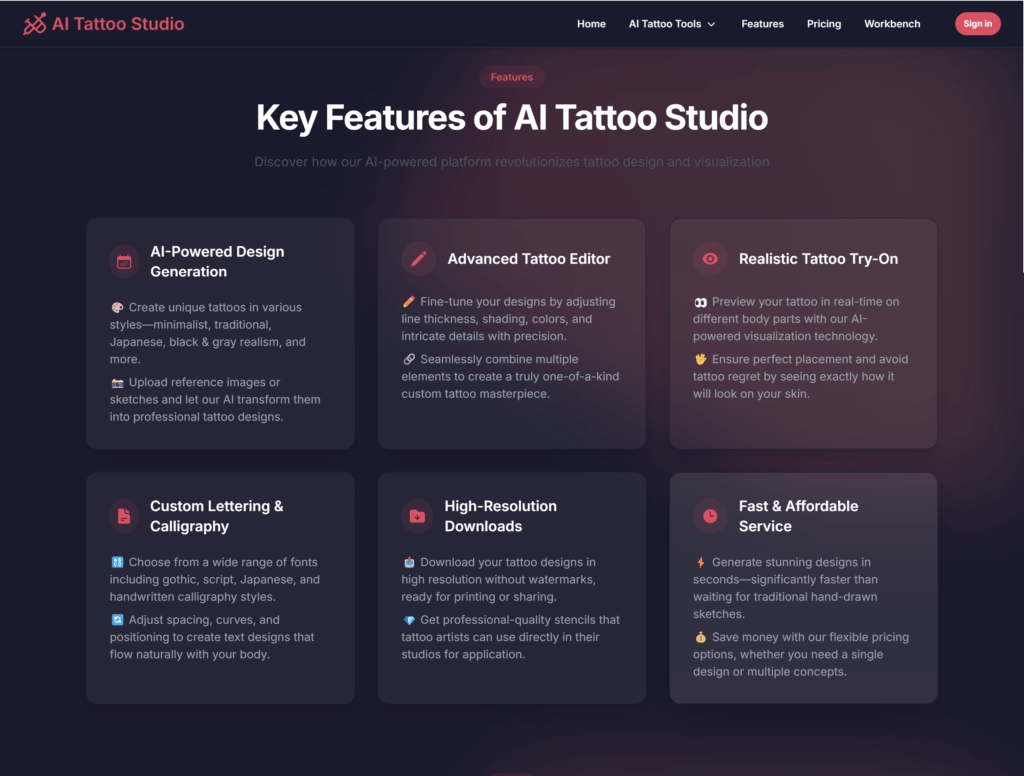
- Text-to-Tattoo Generation: I was able to type in something as specific as “a geometric wolf with celestial elements” and receive a design in seconds. It interprets artistic keywords much better than a standard Google Image search.
- Style Customization: This is where it shines. You can select from specific styles like Traditional, Realism, Minimalist, Fine Line, Blackwork, or even Bio-mechanical.
- Virtual Try-On (Body Visualization): I found this feature particularly clever. It allows you to “project” your generated design onto various body parts (arms, legs, back) to see how the scale and flow of the design look on human anatomy.
- High-Definition Downloads: Unlike some free generators that give you blurry results, this tool provides high-res files which, based on my research, are essential for tattoo artists to create clean stencils.
- Inspiration Gallery: If you’re stuck, you can browse a massive library of AI-generated ink to see what prompts others used to get their results.
Use Cases of AI Tattoo Studio
Who is actually using this? Based on my research on the site and community threads, here are the most common scenarios:
- The “First-Timer” Planner: If you’re nervous about your first tattoo, you can use this to experiment with 50 different versions of an idea before committing.
- Professional Tattoo Artists: I saw several mentions on artist forums that pros use this as a “digital mood board” to quickly show clients different layout options during a consultation.
- Cover-Up Conceptualization: It’s great for seeing how a new, darker design might sit over an old piece of ink.
- Niche Style Exploration: For someone who wants a very specific mix—like “Japanese Irezumi mixed with Cyberpunk”—this tool can visualize that hybrid style instantly.
How To Use AI Tattoo Studio?
To get started, I first headed to aitattoostudio.ai. The onboarding is very straightforward. Here is the path I took:
- Sign Up/Login: I created an account to save my designs. The dashboard is clean and keeps your “history” in one place.
- Enter Your Prompt: I went to the main generator and typed “A minimalist mountain range inside a compass.”
- Select Your Style: I chose “Fine Line” from the dropdown menu to keep it subtle.
- Generate and Refine: I hit “Generate.” Within about 15 seconds, I had four distinct variations. I picked my favorite and used the “Upscale” button to make it crisp.
- The Virtual Preview: I clicked the “Try on Body” button to see how the compass would look on a forearm.
FAQ: Everything You Need to Know Before You Ink
Are the tattoo designs actually unique, or am I going to see someone else with my tattoo?
This was my first concern, too! But the cool thing about their AI is that it uses advanced algorithms to ensure every generation is original. Even if two people use the exact same prompt and style settings, the AI will produce a different piece of art for each person. You’re getting a design that is exclusively yours.
How much does this actually cost? (Is there a free trial?)
Yes, I found that they offer a free trial to get you started. If you decide you want to do a deep dive and generate a bunch of options, they use a credit system. It’s actually very affordable—if you buy a package, the cost can drop to as low as $0.06 per design. Essentially, for the price of a cup of coffee, you could generate dozens of variations.
Can I upload my own sketches or reference photos?
Absolutely. This is one of the features I found most useful during my research. If you have an existing image you love or a rough sketch you’ve drawn, you can upload it as a reference. The AI analyzes your image and creates new designs that maintain the original vibe while adding a professional, “tattoo-ready” polish.
How do I get the “perfect” result from the AI?
According to the power users I’ve tracked down, the secret is in the “Advanced Settings.” To get the best results, you’ll want to play with the Guidance Scale and Illusion Strength. Being specific in your text prompt (e.g., “fine line minimalist lotus” rather than just “flower”) and choosing a clear style from their menu makes a massive difference in the quality of the output.
Is the final design ready for my tattoo artist to use?
Yes, but with a small caveat. The tool generates high-resolution files that are perfect for creating stencils and serving as a reference. However, the official advice (which I 100% agree with) is to always show the design to your professional tattoo artist. They might need to make small technical adjustments to ensure the ink ages well on your specific skin type and body placement.
Can I change the colors or details after the design is generated?
I was happy to find that they have a built-in editor. If you love a design but want it in a different color, size, or level of detail, you can tweak those aspects right on the platform without having to start from scratch. You can also generate “variations” of a specific design if you’re “almost there” but want to see a few more options.
So, what’s the bottom line?
AI Tattoo Studio is a powerful “imagination partner.” It’s not meant to replace the soul and skill of a human tattoo artist, but it’s arguably the best tool on the market for moving past “I don’t know what I want” into “This is exactly the vibe I’m looking for.” Whether you’re a collector or a pro, it’s a massive time-saver.
Have you tried AI Tattoo Studio for your latest design? Share your experience (and your ink!) in the comments at AiSupersmart.com!
 Login with Google