
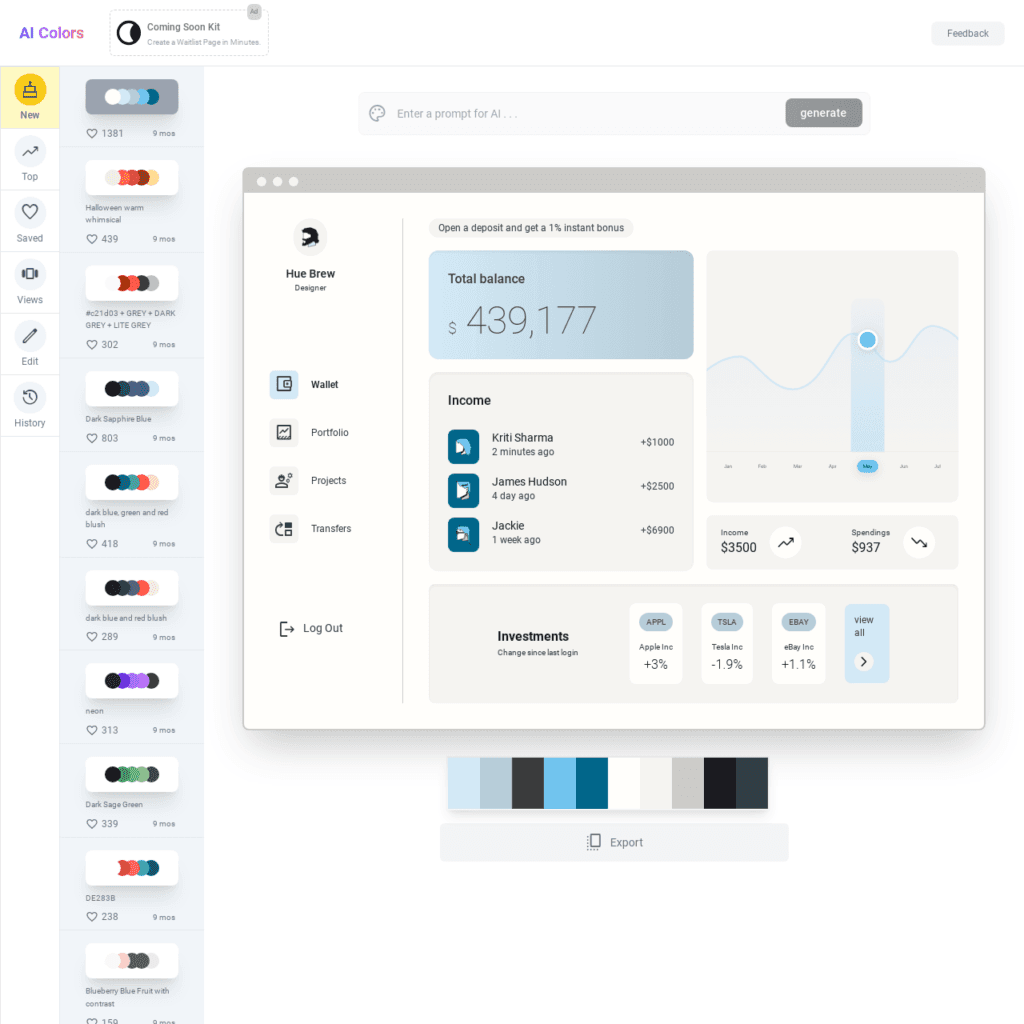

AIColors.co is an AI-powered color palette generator that allows users to create unique and beautiful color palettes for their projects. The tool uses a variety of features, including text-based color generation, pre-generated palettes, color editing, real-time visualization, color locking, and palette sharing, to help users create the perfect color palette for their needs. AIColors.co is a valuable resource for designers, artists, developers, marketers, and anyone else who works with colors.
AI Colors (aicolors.co) Review: The Smarter Way to Pick Your Next Palette
Hey there! If you’ve ever sat staring at a blank screen trying to figure out which shade of blue won’t make your website look like a 2004 blog, you’re not alone. Choosing color palettes is notoriously tricky. Recently, I spent some time digging into AI Colors, and honestly? It’s a game-changer for anyone who isn’t a professional designer but wants to look like one.
I’ve done the legwork—scoured their site, tested the generator, and checked in with the design community on Reddit—to see if this tool actually lives up to the hype. Here’s the breakdown.
Key Information
- What it is: A text-to-palette AI tool that generates unique color schemes based on descriptive prompts.
- Best For: Web developers, UI/UX designers, and brand owners who need cohesive, accessible color schemes quickly.
- My Key Finding: Its standout feature is the “Visualize” mode, which lets you see your colors applied to a real-world website mockup in real-time, rather than just looking at a row of colored circles.
What is AI Colors?
At its core, AI Colors (aicolors.co) is an AI-driven color palette generator. Unlike traditional tools that give you random combinations or rely on color wheel math, this tool uses a Large Language Model (LLM) to understand context.
If you type in “Eco-friendly organic coffee shop,” the AI doesn’t just give you green; it understands the “vibe” and suggests earthy tones, creams, and muted accents. It solves the “blank canvas” problem by translating human language into design language. According to their site, the goal is to streamline the design process by removing the guesswork from color theory.
Features of AI Colors
After exploring the dashboard, here are the features that actually move the needle:
Related Posts
- Prompt-Based Generation: You can type literally anything—from “Cyberpunk neon city” to “Professional law firm”—and the AI generates a matching palette in seconds.
- Real-Time Visualization: This is my favorite part. As you change colors, the tool updates a mockup of a landing page or dashboard on the same screen so you can see if the contrast actually works.
- Accessibility Check: I found that the tool helps you identify if your text is readable against your background colors, which is a huge win for WCAG compliance.
- One-Click Export: Once you’re happy, you can export your palette directly to CSS, SCSS, JSON, or even Tailwind CSS config files.
- Edit & Lock: If you love one specific color but hate the others, you can “lock” that color and ask the AI to regenerate the rest of the palette around it.
Use Cases of AI Colors
Who is this actually for? Based on my research and the common threads I’ve seen online, here are the top use cases:
- Web Developers: Quickly generating a cohesive “Dark Mode” vs. “Light Mode” for a new SaaS project without hiring a designer.
- Branding Packages: Creating a mood board for a new brand by testing out different “vibes” (e.g., “Luxurious and Minimalist”) through text prompts.
- UI/UX Prototyping: Designers on Reddit have mentioned using AI Colors to quickly cycle through variations during the wireframing stage to show clients different “moods.”
- Content Creators: Finding consistent colors for YouTube thumbnails or social media templates that match a specific theme.
How To Use AI Colors?
To get started, I went to their homepage at aicolors.co. The process is refreshingly simple. Here’s how I did it:
Step 1: Enter Your Prompt
Right on the landing page, there is a prominent text bar. I typed in “Modern Fintech App with a trustworthy feel” to see how it handled specific industry vibes.
Step 2: Generate and Browse
After clicking “Generate,” the site instantly refreshed with a primary, secondary, and accent color. The cool part? The sidebar immediately showed me how those colors would look on buttons and headers.
Step 3: Fine-Tune the Palette
I didn’t love the specific shade of blue it gave me, so I used the color picker to nudge it toward a deeper navy. I then hit the “Generate” button again (while keeping my navy locked) to find better secondary colors.
Step 4: Export the Code
Once it looked perfect, I clicked the “Export” button in the top right. It gave me a clean snippet of Tailwind CSS code that I could drop straight into a project.
FAQ
Is AI Colors free to use?
Yes, you can generate and visualize palettes for free. Some advanced features or saving multiple palettes to an account may require a pro version, but the core AI generation is very accessible.
How does it compare to Coolors.co?
On Reddit, the general consensus is that while Coolors is the “industry standard” for manual editing, AI Colors is superior for starting a project because it understands context. Coolors is a library; AI Colors is a creative partner.
Can I use these colors for commercial projects?
Absolutely. The palettes generated are yours to use for websites, logos, or any commercial venture.
So, what’s the bottom line?
If you’re someone who spends way too much time scrolling through color palettes only to realize they look “off” once you actually apply them to a website, AI Colors is a must-try. It bridges the gap between a vague idea (“I want it to look calm”) and actual code you can use.
It’s fast, the visualization feature prevents design mistakes before they happen, and the prompt-based system feels like magic.
Have you tried AI Colors for your projects yet, or are you still a “hit the spacebar for a random color” kind of person? Share your experience in the comments over at AiSupersmart.com!
 Login with Google