
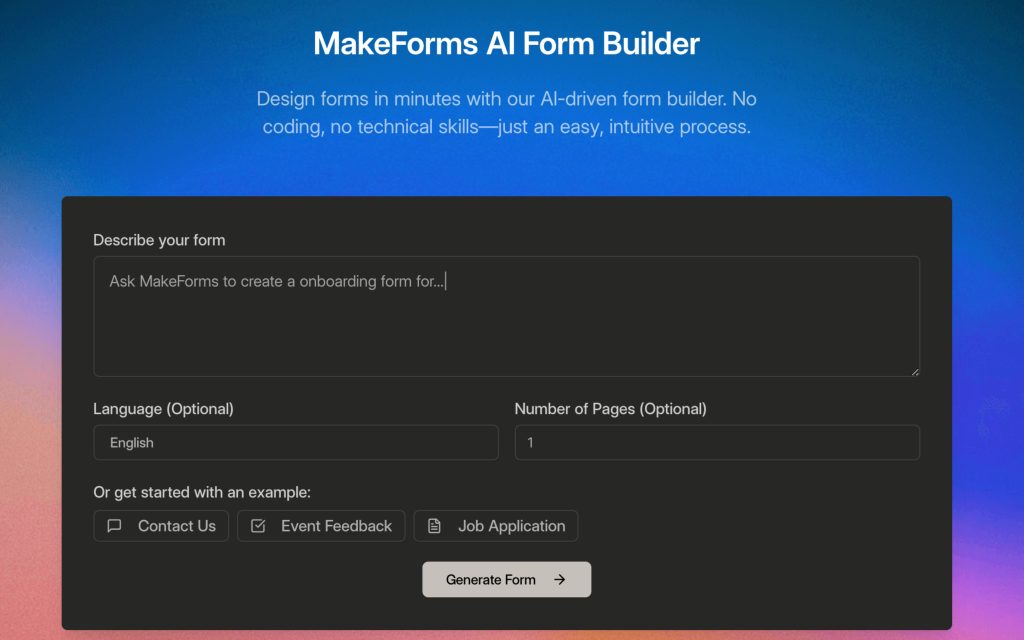

Introducing MakeForms AI
- Quickly build forms by simply describing what you need.
- The AI instantly generates fields, logic, and layout for you.
- No coding or technical skills are necessary.
- Get started for free and create powerful, custom forms in minutes.
Key Points :
The 7-Minute Challenge: Building a Client Intake Form with AI
My goal was simple: create a “smart” intake form for a fictional marketing agency. It needed to gather basic contact info, ask about the project, and then—this is the important part—show different questions based on the prospect’s budget.
Here’s exactly how it went down.
Step 1: The AI Prompt (The Most Important Part)
Instead of starting with a blank canvas, I went straight to the AI Form Generator. This is where you make or break the experience. A lazy prompt gives you a lazy form.
I gave it this specific command:
“Create a multi-page lead qualification form for a digital marketing agency. The first page should collect name, email, company name, and website. The second page should ask about their primary goal (e.g., more leads, brand awareness). The third page should ask for their monthly marketing budget with options: <$2k,
2�−2k−5k, >$5k. The final page should have a text box for any additional comments.”
.lwrp.link-whisper-related-posts{ margin-top: 40px; margin-bottom: 30px; } .lwrp .lwrp-title{ }.lwrp .lwrp-description{ } .lwrp .lwrp-list-container{ } .lwrp .lwrp-list-multi-container{ display: flex; } .lwrp .lwrp-list-double{ width: 48%; } .lwrp .lwrp-list-triple{ width: 32%; } .lwrp .lwrp-list-row-container{ display: flex; justify-content: space-between; } .lwrp .lwrp-list-row-container .lwrp-list-item{ width: calc(20% - 20px); } .lwrp .lwrp-list-item:not(.lwrp-no-posts-message-item){ max-width: 150px; } .lwrp .lwrp-list-item img{ max-width: 100%; height: auto; object-fit: cover; aspect-ratio: 1 / 1; } .lwrp .lwrp-list-item.lwrp-empty-list-item{ background: initial !important; } .lwrp .lwrp-list-item .lwrp-list-link .lwrp-list-link-title-text, .lwrp .lwrp-list-item .lwrp-list-no-posts-message{ }@media screen and (max-width: 480px) { .lwrp.link-whisper-related-posts{ } .lwrp .lwrp-title{ }.lwrp .lwrp-description{ } .lwrp .lwrp-list-multi-container{ flex-direction: column; } .lwrp .lwrp-list-multi-container ul.lwrp-list{ margin-top: 0px; margin-bottom: 0px; padding-top: 0px; padding-bottom: 0px; } .lwrp .lwrp-list-double, .lwrp .lwrp-list-triple{ width: 100%; } .lwrp .lwrp-list-row-container{ justify-content: initial; flex-direction: column; } .lwrp .lwrp-list-row-container .lwrp-list-item{ width: 100%; } .lwrp .lwrp-list-item:not(.lwrp-no-posts-message-item){ max-width: initial; } .lwrp .lwrp-list-item .lwrp-list-link .lwrp-list-link-title-text, .lwrp .lwrp-list-item .lwrp-list-no-posts-message{ }; }>Related Posts
I hit “Generate,” and in about 30 seconds, it spat out a fully functional, multi-page form.
Step 2: Reviewing the AI’s First Draft (The Good & The Bad)
The AI draft was shockingly good. It correctly created the multi-page structure, used the right field types (email, text, radio buttons), and even pre-filled the budget options exactly as I’d asked.
But it wasn’t perfect. It was a solid B+. To get it to an A+, I needed to make a few quick tweaks:
- It missed a “File Upload” field. I wanted clients to be able to upload a project brief.
- The questions were a bit generic. I rephrased “Primary Goal” to “What’s the #1 thing you want to achieve?” to sound more human.
Making these changes was a simple drag-and-drop process. The AI did the heavy lifting; I just did the final polish.
Step 3: Customizing the Look & Feel
The default form looks clean but generic. In the “Design” tab, I quickly added the agency’s logo, changed the button colors to match our brand, and switched the font. It took maybe two minutes.
The result was a professional-looking form that felt custom-built, not spat out by a robot.
Beyond the Basics: 3 “Power Features” Competitors Don’t Show You
This is where MakeForms started to seriously impress me. The AI is a great starting point, but the advanced features are what make it a true professional tool.
1. Conditional Logic That Actually Makes Sense
This is the “smart” part I was talking about. I wanted to add a detailed section with specific service questions, but only for high-value leads.
Here’s the rule I created: IF “Monthly Marketing Budget” is “>$5k,” THEN show the “Advanced Project Details” section.
Setting this up in MakeForms was visual and intuitive. You don’t need to be a programmer. You just create simple “if/then” rules. This feature alone is a massive upgrade over simpler form builders.
2. Workflows: Putting Your Data to Work Automatically
A form is useless if the data just sits there. I wanted new leads to be handled automatically. Using the “Workflows” feature, I set up a simple two-step automation:
- When Form is Submitted: A trigger fires.
- Then…
- Send a notification to our team’s Slack channel.
- Add a new row with the lead’s info to a Google Sheet.
This is incredibly powerful. You can connect to hundreds of apps, send automated emails, or even trigger actions in your CRM, all without using a separate tool like Zapier.
3. The Security Features You Can’t Ignore (HIPAA, GDPR)
If you’re a marketer, this might not seem exciting, but if you’re in healthcare, finance, or any field that handles sensitive personal information, this is a huge deal. MakeForms offers HIPAA and GDPR compliance.
Many competitors lock this behind their most expensive “Enterprise” plans. Having this available on more accessible plans is a major advantage for smaller businesses that still need to prioritize data security.
So, Is MakeForms Worth It? My Final Verdict
After spending a week with it, I can say this: MakeForms is the real deal.
It has successfully bridged the gap between overly simple form builders and overly expensive enterprise solutions. The AI generator is the hook, but the powerful logic, built-in workflows, and serious security features are what make it a truly valuable business tool.
Who is it for?
If you’re a small business owner, a marketer, or a consultant who needs to create more than just a simple contact form, it’s a fantastic choice. If you need to qualify leads, take payments, or onboard clients automatically, it’s a no-brainer.Who should skip it?
If you only need a basic contact form once a year, it might be overkill. If your brand’s specific aesthetic can only be achieved with Typeform’s unique feel, then stick with what works.For everyone else, especially those feeling constrained by their current tool, I absolutely recommend giving MakeForms a try. It’s one of the few AI tools I’ve tested that feels less like a novelty and more like a fundamental upgrade to an everyday business task.
Your turn: what’s the most frustrating thing about your current form builder? Share it in the comments below!
 Login with Google