
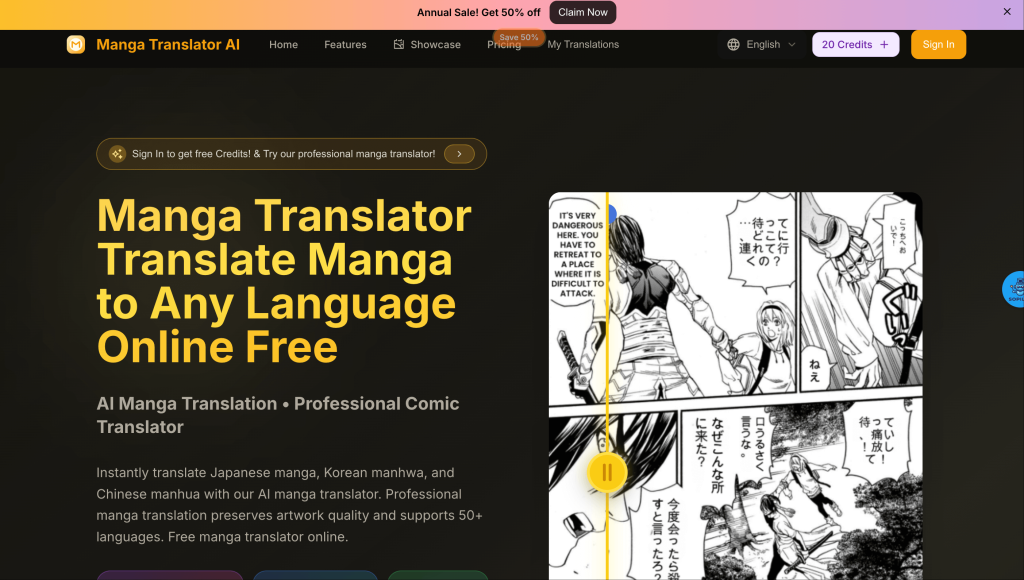

Manga Translator AI instantly translates Japanese manga, Korean manhwa, and Chinese manhua into any language. Professional manga translator with AI technology preserves artwork quality and supports 50+ languages. Free manga translator online.Manga Translator AI is a revolutionary online tool that instantly translates Japanese manga, Korean manhwa, Chinese manhua, and Western comics into any language. Our advanced AI technology preserves original artwork, speech bubbles, and layout while delivering accurate, natural translations.
Key Points :
What is Manga Translator and How Does It Actually Work?
You might think this is just another version of pointing Google Translate at an image. It’s way more sophisticated than that. It’s designed specifically for the unique structure of a manga page.
It’s More Than Just Google Translate
Where a simple translator just gives you text, Manga Translator automates the entire tedious process of scanlation (fan translation). It’s a multi-step assembly line that used to take hours of manual work in Photoshop.
The 4-Step AI Process (Explained Simply)
When you upload a page, the AI performs four key tasks in about 30 seconds:
- Text Detection (OCR): It scans the page to find all the Japanese characters, intelligently identifying them inside speech bubbles and captions.
- Translation: It sends that detected text to a translation engine (similar to DeepL or Google Translate) to convert it to English.
- Redrawing/Cleaning: This is the magic part. The AI digitally “paints over” the original Japanese text, leaving you with a clean, empty speech bubble.
- Typesetting: Finally, it takes the translated English text and places it back into the corresponding speech bubble, attempting to fit it nicely.
This entire workflow—detect, translate, clean, typeset—is the core of what makes this tool so powerful.
My Hands-On Test: Translating a Real Manga Page from Start to Finish
Talk is cheap. I grabbed a page from a public domain manga to see what Manga Translator could really do.
Step 1: Choosing and Uploading My Raw Page
I started with a clean, high-resolution black-and-white manga page. It has a few dialogue bubbles and some vertical text, which can sometimes be tricky for AI.
The goal is to give the AI the best possible source material. Garbage in, garbage out.
Related Posts
- Corporate Headshots AI
- Elon Musk’s AI Chatbot Grok Sparks Controversy in India: Free Speech or Digital Chaos?
- OBSERVE.AI: The Leading AI Platform Revolutionizing Contact Center Performance
- Meta Bets Big on India: Paying Americans $55 an Hour to Build Hindi AI Friends That Actually ‘Get’ Indian Culture
- Why Luma AI Is the Best Tool for Next-Gen 3D Video Creation in 2025
I just dragged and dropped the file into the Manga Translator web app. The interface is clean and simple.
Step 2: Running the AI and First Impressions
I selected the source language (Japanese) and target language (English) and hit “Translate.” A progress bar appeared, and in about 25 seconds, it was done.
My first impression was, frankly, “Whoa.” It wasn’t perfect, but an entire page was suddenly readable. That’s a huge time-saver.
Step 3: Analyzing the Raw AI Output
Here’s the side-by-side of the original and the very first AI-generated translation, with no manual edits.
The good: The dialogue was about 90% correct and made sense in context. The redrawing was clean, and the text was placed correctly inside the bubbles.
The not-so-good: One line felt a bit too literal, a common issue with machine translation. The vertical text was handled okay, but the font size was a bit small.
Step 4: The Built-in Editor: Making Manual Fixes
This is a critical feature. Manga Translator includes an editor that lets you click on any speech bubble and fix the AI’s work. You can correct translations, adjust font sizes, or even re-align the text.
I clicked on the one “clunky” sentence and rephrased it to sound more natural in English. This took me about 15 seconds.
With a few quick tweaks, the page went from “good enough” to genuinely readable.
The Big Question: How Good is the Translation Quality?
This is the most important part. Is the translation actually reliable?
Dialogue Accuracy: Hits and Misses
For clear, standard Japanese, I found the accuracy to be surprisingly high. It correctly identified who was speaking and maintained the general tone of the conversation.
However, it will not capture nuance, sarcasm, or deep cultural context. It translates the words, not necessarily the meaning. For understanding the plot, it’s fantastic. For a literary analysis, you’ll miss a lot.
What About SFX (Sound Effects)?
This is a weak point. The AI often tries to translate onomatopoeia (like “ドンドン” or “don don” for a loud bang), which usually looks weird in English. Most of the time, I found it was better to just tell the AI to ignore the SFX or delete the translation in the editor.
The “Machine Translation” Feel: Does it Lack Soul?
Yes and no. The raw output can sometimes feel stiff and robotic. This is where the editor is your best friend.
By spending just a minute or two per page rephrasing awkward sentences, you can inject a lot of that missing “human” feel back into the dialogue. It won’t be as good as a professional translator, but it’s a massive leap from unreadable Japanese.
Manga Translator App: Answering Your Biggest Questions
I see these questions pop up all the time on Reddit and forums, so let’s tackle them head-on.
Is Manga Translator free to use?
It uses a credit system. You get a few free credits when you sign up to test it out. After that, you buy credits to translate more pages. This model is great because you only pay for what you use, whether it’s one page or a whole volume.
How does it compare to translating manually with DeepL and Photoshop?
I made a quick table to break it down.
| Feature | Manga Translator | Manual (DeepL + Photoshop) |
| Speed | 1 minute per page | 15-30 minutes per page |
| Cost | Pay-per-page (credits) | Free (if you own Photoshop) |
| Quality | Good, but needs edits | Potentially higher (human touch) |
| Ease of Use | Extremely easy | High learning curve |
| Skill Required | None | Photoshop skills needed |
The bottom line: The manual method gives you more control and potentially higher quality, but Manga Translator is exponentially faster and easier.
Does it work for languages other than Japanese (like Korean or Chinese)?
Yes. The tool supports translating from Japanese, Chinese, and Korean, which covers most manga, manhwa, and manhua you’ll find.
Is the redrawing and cleaning perfect?
It’s very, very good, but not flawless. On pages with complex art or text overlapping with characters, the AI can sometimes leave small, blurry artifacts. For 95% of panels, though, the cleaning is seamless.
So, Is Manga Translator Worth It? My Final Verdict
After running several pages through it and fixing them up, I have a clear answer.
Yes, Manga Translator is absolutely worth it for its intended audience. It’s a game-changer for anyone who wants to quickly read and understand untranslated manga without waiting years for an official release or spending hours learning complex editing software.
It’s not going to replace professional scanlation groups who polish every line to perfection, and it’s not meant to. It’s a tool for accessibility and speed. It empowers a single person to do what used to take a whole team, bridging the language gap for countless stories that would otherwise remain unknown.
For the price of a coffee, you can translate an entire chapter in minutes. For me, that’s an incredible value.
 Login with Google