

I’d like to recommend several very useful AI video generation software programs. I use them myself, and they’re very convenien.
Our advanced Restore Photo AI technology can handle all types of photo damage. Use our Restore Image tool for professional results.Restore Image colors perfectly with our AI. Bring vibrancy back to old, faded, or discolored photographs using advanced photo restoration technology.
Get professional restore image results instantly. Our Restore Photo AI applies the best restoration techniques automatically for perfect results.Our Restore Photo AI enhances facial features with precision. Restore image clarity and bring back natural beauty in portraits automatically.
Start your restore photo journey by uploading any damaged image. Our Restore Photo AI supports JPG, PNG, GIF, and WebP formats.Watch as our Restore Photo AI analyzes and repairs your image. Advanced algorithms restore photo quality by removing damage and enhancing details automatically.
Key Points :
What’s the Big Deal with AI Photo Restoration, Anyway?
You’ve probably seen those mind-blowing before-and-after pictures on social media. That’s AI photo restoration. In simple terms, these tools have been trained on millions of images. They’ve “learned” what a sharp eye, clear skin, or a non-blurry tree looks like.
When you upload your damaged photo, the AI analyzes it for problems—blur, scratches, faded colors—and then tries to “repaint” the missing or broken parts based on its training. It’s not actually recovering lost data; it’s making a highly educated guess about what should be there. This is why sometimes the results are amazing, and other times… well, you’ll see.
Putting Restorephoto.online to the Test: A Step-by-Step Walkthrough
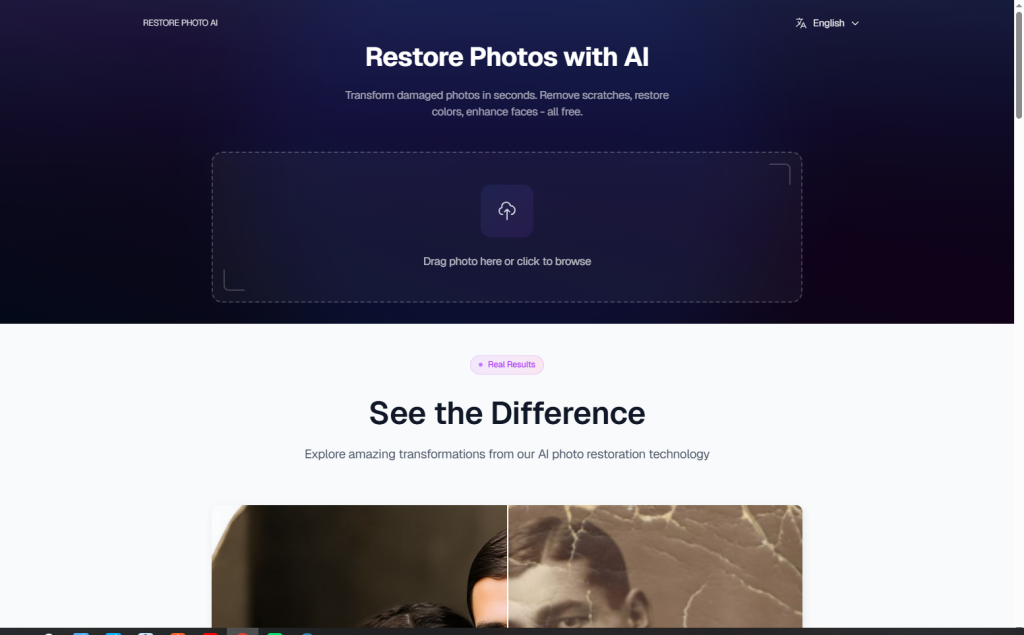
The process itself is incredibly simple, which is a huge plus. It’s clearly designed for people who don’t want to mess with settings.
Related Posts
- Open Source AI Revolution: How Free Models Are Democratizing Artificial Intelligence
- Best Funny AI Tools: Your Guide to AI-Powered Laughter
- I Tried Jobright AI to Automate My Job Hunt. Here’s Honest Review.
- Top 8 Best AI Logo Makers: 2025 Comparison & Reviews
- AI Revolution in Hospitals: Smart Machines Are Now Looking at Your X-rays
Step 1: Uploading Your Photo (and a note on privacy)
You just go to the website, and the upload button is front and center. You can’t miss it. You drag your photo in or select it from your computer. That’s it.
A quick thought on privacy: The site’s privacy policy says they may “store your images for a limited period of time” to improve the service. If you’re restoring a super-sensitive photo, that’s something to keep in mind. For my old family pics, I wasn’t too concerned.
Step 2: The “Magic” Happens
After uploading, the tool gets to work. There are no sliders, no options, no checkboxes for “remove scratches” or “enhance color.” It does everything automatically. This is great for simplicity, but it’s also a downside if you only want to, say, fix the color but not the sharpness. You get what the AI gives you. The process took about 15-30 seconds for each of my photos.
Step 3: Analyzing the Results – The Good, The Bad, and The AI Weirdness
This is where things get interesting. Once it’s done, you get a slider to compare the before and after.
For the Blurry Beach Portrait, I was genuinely impressed. It sharpened my parents’ faces significantly. You could suddenly see their expressions clearly. It also boosted the color, making the blue sky pop. It wasn’t perfect—the skin looked a little too smooth, like a beauty filter—but it was a massive improvement.
For the Scratched Wedding Pic, the results were more of a mixed bag. It did a decent job of removing the smaller, finer cracks. But the larger, more prominent scratches were still visible. The AI seemed to smooth over them rather than intelligently fill them in. It’s better than the original, but not a complete fix.
Finally, the B&W Grandfather Shot. The tool automatically colorized it. The sharpness was definitely improved, but the colors felt a bit generic. My grandpa’s suit was a standard blue and his skin tones were okay, but it lacked the nuance of real color photography. It felt like a solid first draft, not a final piece.
How Does Restorephoto.online Compare to a Competitor? (The Remini Test)
To get some perspective, I took my best candidate—the blurry beach photo—and ran it through Remini, another hugely popular AI restoration app.
The difference was immediately clear.
My Take: Remini did a slightly better job. While both tools cleared up the blur, Remini’s result looked more natural. It preserved more of the original film grain and skin texture, avoiding the “plastic” look that Restorephoto.online created. However, Remini is app-based and heavily pushes its subscription. Restorephoto.online is web-based and simpler to use for a quick, free fix.
So, What’s the Bottom Line?
After running my sad, old photos through the wringer, I can say that Restorephoto.online is a surprisingly capable tool for being completely free. It’s at its best when you throw a blurry or faded portrait at it. It will, in most cases, give you a dramatically better image in under a minute.
It is NOT a magic wand, though. It won’t perfectly fix every scratch, and the results can sometimes look a bit artificial or “over-processed.” For a quick, no-cost, and zero-effort improvement on your old photos, it’s absolutely worth a try. For professional-grade results or fixing very heavy damage, you’ll still need more powerful software or a human expert.
For my blurry beach photo? It’s a huge win. The result is now the new “official” version in my family album. 🙂
What have you tried for restoring old photos? Did you get great results or an AI nightmare? Let me know down below
 Login with Google