
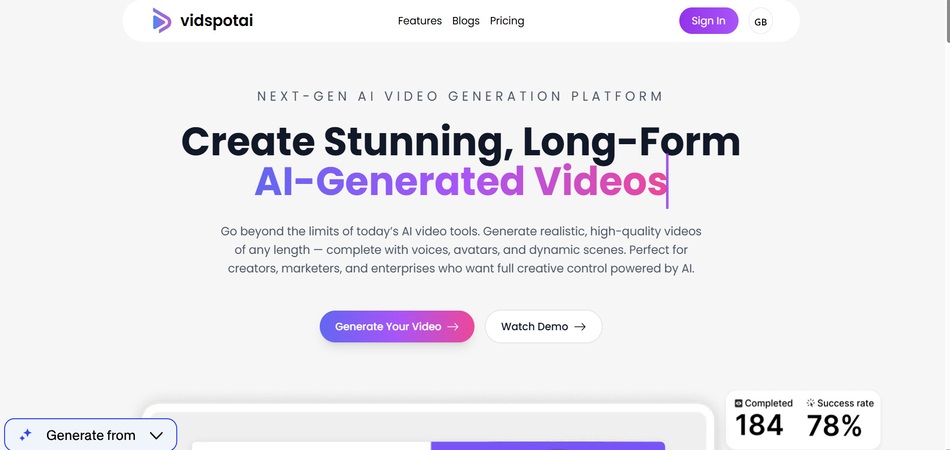

VidSpotAI is an AI-powered video generator that creates long-form, high-quality videos using avatars, voice-overs, and multiple AI video models. It supports 100+ languages, making it easy to produce marketing videos, tutorials, and storytelling content quickly. The tool lets you generate realistic, multilingual videos without needing filming, editing skills, or heavy equipment. Experience unmatched flexibility and creativity. Generate long-form videos, leverage multiple AI models, and create content in over 100 languages. Our platform empowers marketers, creators, and enterprises to produce professional-grade videos effortlessly.
Key Points :
What Actually Is Vid Spot AI?
Unlike standalone tools like Runway or Pika that run on their own proprietary models, Vid Spot AI functions more like a powerhouse aggregator.
Think of it as a command center. Instead of jumping between Midjourney for images, Runway for motion, and ElevenLabs for audio, Vid Spot integrates these capabilities. It leverages models like Google Veo 3, Kling AI, and Midjourney to generate coherent, long-form video from simple text or image prompts.[1]
The big promise? Breaking the “10-second barrier.” Most AI video tools suffer from “temporal incoherence”—meaning the longer the video goes, the more the AI hallucinates (e.g., a person’s face melting or a car turning into a boat). Vid Spot claims to solve this.
The “3-Minute” Test: My Hands-On Experience
I didn’t want to just read the features list. I wanted to see if I could create a documentary-style intro about “The Future of Mars Colonization” completely inside Vid Spot, without opening Adobe Premiere.
Step 1: The Setup & Model Selection
When you log in, the dashboard is surprisingly clean. You aren’t bombarded with settings. However, the most important choice happens right at the start: Model Selection.
I noticed Vid Spot allows you to toggle between models.
Related Posts
- Pika Labs vs. Runway Gen-2: Which is Better for Short-Form Video Clips?
- Bark Translator: Baidu’s AI Tool Aims to Decode What Your Dog is Really Saying
- Makereels.ai
- AI in Esports: How Machine Learning is Transforming Anti-Cheat Systems
- AI for Etsy Sellers: Writing Product Descriptions and Creating Listing Images that Sell.
- My Choice: I went with the Veo 3 integration for the video generation because it handles physics (like dust storms on Mars) better than older models.
Step 2: The Prompt (Context is King)
I used a prompt that would usually break a standard generator:
“Cinematic drone shot of a futuristic colony on Mars, red dust storm clearing to reveal glass domes, rover driving in foreground, 16:9 aspect ratio, photorealistic, 4k.”
My Experience: The generation took longer than standard tools—about 2-3 minutes of processing time. But this is actually a good sign.[2][3] Fast generation usually equals low quality.
Step 3: The Result
Here is the honest truth about the output:
- Consistency: The rover actually stayed a rover for the full duration of the shot. It didn’t morph into a rock.
- Length: It successfully generated a cohesive flow that was significantly longer than the standard 4-second bursts I get from Pika.
- The “Glitch” Factor: Around the 2-minute mark, the background texture got a little smooth/blurry. It wasn’t perfect, but for a background visual while a narrator speaks? Totally usable.
Key Features That Actually Matter
1. Long-Form Generation (The Killer Feature)
This is why you are here. Vid Spot allows for videos up to 5 to 7 minutes.
If you are doing YouTube Automation (Faceless Channels), this is massive. Previously, you had to generate 60 individual clips and stitch them. Vid Spot lets you generate “scenes” that are long enough to hold a viewer’s attention.
2. Multi-Model Access
This is the feature most people overlook. Because Vid Spot plugs into Midjourney and Kling, you can use Midjourney to generate a perfect “base image” and then use Kling to animate it.
- Why this helps: Midjourney has the best aesthetics; Kling has the best motion. Vid Spot lets you combine them.[4]
3. Multilingual Support
I tested a script in Spanish to check the lip-syncing (using their avatar feature). It supports over 100 languages.[1] The dubbing was solid—not cinema-grade, but definitely good enough for social media content.
Vid Spot AI vs. The Big Players
| Feature | Vid Spot AI | InVideo AI | Runway Gen-2 |
| Max Length | High (5-7 mins) | High (via stock footage) | Low (4-18 secs) |
| Source Material | Generative AI | Mostly Stock Footage | Generative AI |
| Realism | High (uses Veo/Kling) | Low (Stock look) | Very High |
| Best For | Creative Storytelling | Informational/How-To | Artistic B-Roll |
My Verdict: Use InVideo if you want a slideshow of stock footage. Use Runway if you want a weird, artsy 4-second clip. Use Vid Spot if you want to generate new footage that lasts longer than a Vine.
So, what’s the bottom line?
My final verdict is that Vid Spot AI is currently the best bridge we have between “short, trippy AI clips” and “full-length video production.”
It is not perfect—no AI video tool is yet. But if you are trying to build a content library without filming a single frame, this tool does the heavy lifting that used to take three separate apps to accomplish.
My Advice: Start with the free trial to get a feel for the “Veo 3” model. If you can get one solid 3-minute video out of it, the subscription pays for itself immediately compared to hiring an editor.
Have you tried breaking the 10-second limit with other tools? Let me know your experience in the comments below—I’m always looking for new workflows.
 Login with Google