
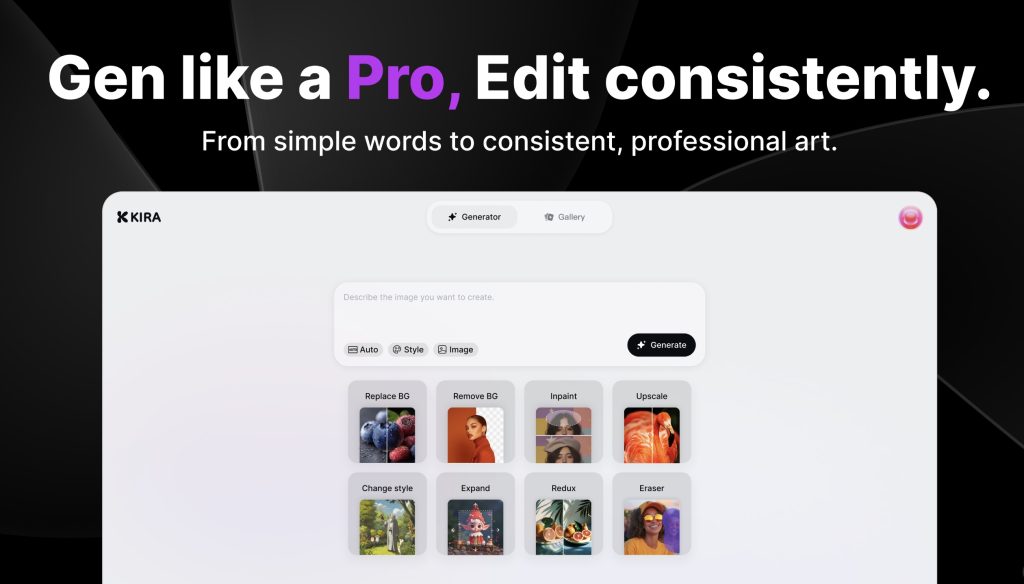

Kira.art is a next-generation AI photo editor that helps anyone create clean, aesthetic photos with almost no effort. Instead of spending time adjusting sliders, fixing lighting, or searching for the right filter, users can simply describe the look they want and Kira generates it. The editor works with natural language, understands style references, and produces consistent visual output across a full set of images. Whether it’s soft girl tones, film grain, travel mood, or high-contrast editorial looks, Kira makes it easy to polish photos for social media, personal galleries, or brand visuals. With fast rendering, conversational editing, and support for creative workflows, Kira.art gives visual designers and everyday creators a simple way to turn ordinary pictures into beautiful, share-ready images.
Key Points :
What Actually Is Kira Art?
Think of Kira Art as a “rent-a-supercomputer” for artists.
Under the hood, it is running Stable Diffusion, the most powerful open-source AI engine. Usually, to use Stable Diffusion, you need a $2,000 gaming PC. Kira Art runs the software on their servers and streams the interface to your browser.
Why I prefer it over DALL-E or Bing Create:
- No Censorship Filters: It’s much less restrictive regarding artistic nudity or complex concepts that other tools block.
- Control: You can control the aspect ratio, the camera angle, and the lighting specifically.
- Models: You can switch between models. Want a Pixar look? Switch the model. Want hyper-realism? Switch again.
The Interface: Does It pass the “Vibe Check”?
When you first log in, it can look a little busier than the empty white box of Google Gemini or ChatGPT. Don’t panic. It’s actually laid out very logically.
The workflow goes from Left to Right:
- Pick your Model (The brain).
- Write your Prompt (The instruction).
- Tweak Settings (The controls).
I found the site to be snappy. Images usually generate in 5-10 seconds, which is significantly faster than Midjourney’s “Relax” mode.
Related Posts
The Secret Sauce: How to Use LoRAs (And Why You Need Them)
This is the main reason I recommend Kira Art.
If you use DALL-E and ask for “A character in the style of Cyberpunk Edgerunners,” it guesses what that looks like.
Kira Art uses LoRAs (Low-Rank Adaptations). Think of these as “Style Plugins.” You can browse a library of thousands of styles, characters, or clothing types and “plug” them into your prompt.
How I did it:
- I went to the LoRA tab.
- I searched for “Oil Painting.”
- I clicked the card. It automatically added <lora:oilpainting:1> to my prompt.
The Result:
The AI didn’t just try to make it look like a painting; it forced the texture and brushstrokes onto the image perfectly.
My “Golden Settings” Cheat Sheet
The biggest mistake beginners make with tools like Kira Art is leaving the settings on random. If your images look “deep fried” (too orange/contrast-heavy) or messy, it’s your settings.
Here are the exact settings I used to get professional results:
- Sampler: DPM++ 2M Karras (This is the industry standard for crisp details).
- Steps: 20 to 30 (Anything less is blurry; anything more is a waste of time).
- CFG Scale: 7 (This is crucial. Keep it between 5 and 8. If you go to 15, your image will look like a nightmare).
- Dimensions: 512×768 (Portrait) or 768×512 (Landscape). Note: Avoid square 512×512 if you want high-quality portraits.
The Must-Have: The Negative Prompt
In DALL-E, you tell the AI what you want. In Kira Art, you must also tell it what you don’t want.
If you leave the “Negative Prompt” box empty, you will get extra fingers, three legs, or weird blurry backgrounds.
Copy and paste this into the Negative Prompt box for every single generation:
(worst quality, low quality:1.4), monochrome, zombie, (interlocked fingers), (worst quality, low quality, normal quality, lowres, low details, oversaturated, undersaturated, overexposed, underexposed, grayscale, bw, bad photo, bad photography, bad art:1.4), (watermark, signature, text font, username, error, logo, words, letters, digits, autograph, trademark, name:1.2), (blur, blurry, grainy), (bad hands, bad anatomy, bad body, bad face, bad teeth, bad arms, bad legs, deformities:1.3)
Pricing vs. The Competition
Kira Art operates on a credit system.
- Free Tier: You get free credits every day. It’s enough to generate about 10-20 images daily to test the waters.
- Paid Plans: Start relatively cheap compared to the big guys.
My take: If you are a casual user, the free credits are plenty. If you are generating assets for a game or a blog, the subscription is worth it just to skip the queue and get faster generation times.
Bottom Line: Should You Switch?
My final verdict is simple:
If you want one-click “magic” and don’t care about controlling the details, stick with ChatGPT/DALL-E.
However, if you want to create consistent characters, use specific anime styles, or have total control over your image composition without buying a new computer, Kira Art is currently the best browser-based tool on the market.
What has been your experience with web-based AI tools? Have you struggled with “bad hands” before? Let me know in the comments below and I’ll share my fix!
 Login with Google