
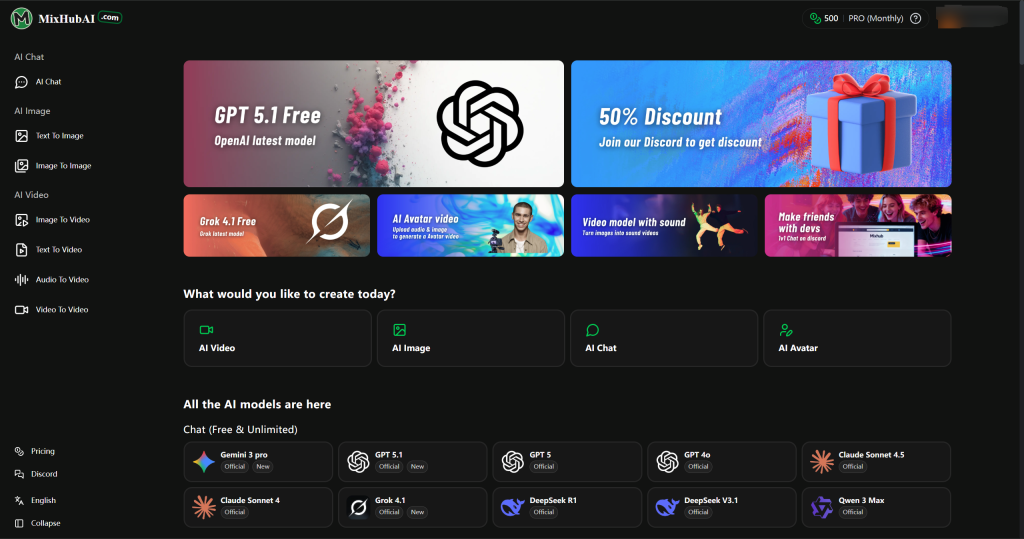

MixHub AI is an all‑in‑one cloud platform that combines the power of advanced AI models like GPT‑5, Flux, Claude, Qwen Image, Kling, and Hailuo to help users create high‑quality text, images, and videos quickly and easily. It offers daily free trials, allowing anyone to explore AI‑driven creativity without installation or cost. Continuously updated with the latest models, MixHub AI is ideal for creators, marketers, designers, and businesses seeking a simple yet powerful tool for content generation, productivity, and innovation.
Key Points :
What Exactly is MixHub AI?
Think of MixHub AI not as a creator, but as a conductor. It is an “aggregator” platform.
Instead of building their own brain from scratch, they connect to top-tier models (like OpenAI’s GPT and Stability AI’s Stable Diffusion) and wrap them in a single, user-friendly interface.
The appeal is simple: Centralization. Instead of tab-switching between an image generator and a chatbot, you have a sidebar with everything you need.
The Chat Test: Is it as Smart as ChatGPT?
My first test was simple. I wanted to see if MixHub could handle the heavy lifting I usually give to ChatGPT.
I threw a complex prompt at it: “Write a 5-email welcome sequence for a coffee subscription brand, focusing on sustainability and origin stories.”
The Results:
The response time was snappy. Since MixHub taps into established LLMs (Large Language Models), the quality was indistinguishable from the standard GPT-3.5/4 experience.
Related Posts
- What I Liked: It includes pre-built “Personas.” You can toggle the AI to act as a “Marketing Expert” or a “Code Wizard” with one click. This saves me the hassle of typing “Act as a…” every time.
- The Hiccup: The context window (how much of the previous conversation it remembers) felt slightly shorter than the native ChatGPT Plus interface. If you are writing a long novel, it might lose the plot after a while.
The Image Generation Test: The Real Surprise
Usually, all-in-one tools struggle here. They tend to produce blurry, weird nightmares.
I tested MixHub’s image generator with this prompt:
“Cyberpunk street food vendor in Tokyo, rain, neon lights, highly detailed, 8k, cinematic lighting.”
The Verdict:
I was actually impressed. MixHub seems to be utilizing Stable Diffusion XL (or a similar high-end model).
- Quality: The lighting was accurate, and the reflections on the wet pavement looked professional.
- Control: It offers aspect ratio controls (square, landscape, portrait) right on the dashboard. No need to memorize complex parameter codes like –ar 16:9.
- The Gap: It struggled with text inside the image. If you need a sign that says “Coffee,” it might spell it “Cffoe.” (To be fair, most AIs struggle with this).
The “Hidden” Features: Voice & Templates
While everyone focuses on text and images, the real value for me was in the Templates.
If you look at the dashboard, you’ll see dozens of specific use-cases: “Instagram Caption,” “YouTube Video Description,” “Blog Post Intro.”
I tested the “YouTube Video Description” generator for a tech review video.
- Input: “Review of the iPhone 15, mentioning battery life and camera.”
- Output: It gave me a perfectly formatted description, including timestamps, hashtags, and a call to action.
Why this matters: It eliminates “Blank Page Syndrome.” You don’t have to prompt-engineer; you just fill in the blanks.
Pricing vs. Value: The Bottom Line
Here is where the math gets interesting.
- The Competitor Stack:
- ChatGPT Plus: $20/mo
- Midjourney: $10/mo
- Jasper/Copy.ai: ~$39/mo
- Total: ~$69/mo
- MixHub AI:
- Typically offers a free tier (limited credits) and paid tiers often starting much lower than the combined cost above.
Who is this for?
If you are a power user who needs the absolute bleeding-edge features (like ChatGPT’s Data Analyst mode or Midjourney’s character consistency), stick to the individual tools.
However, if you are a freelancer, social media manager, or student who needs “80% of the power for 20% of the price,” MixHub is a steal. You get access to text, image, and code generation in one place without bleeding your bank account dry.
My Final Verdict
After 7 days, did I cancel my subscriptions?
Not all of them. I kept ChatGPT Plus because I do heavy coding work. But, I did cancel my separate image generator and copywriting subscriptions. MixHub handled those tasks perfectly well for my needs.
My advice: Start with the free trial/credits. Test the “Templates” section first—that is where the real time-saving magic happens.
What is your current AI stack costing you? Let me know in the comments if you’re looking to consolidate!
 Login with Google