
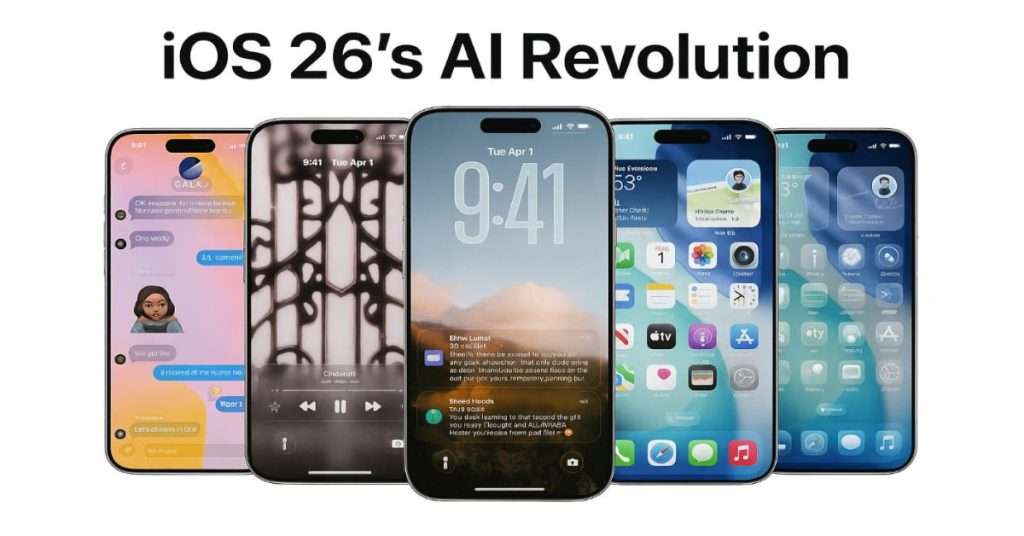
Hold onto your hats, Apple fans—iOS 26 is here, and it’s shaking things up big time! This latest update from the tech giant is rolling out with a dazzling visual refresh and a bundle of futuristic AI tricks that promise to make your iPhone feel like a genius sidekick. But before you start cheering, here’s the twist: not every iPhone gets the full VIP treatment. Yep, some of the slickest features are locked away, reserved only for the newest models like the iPhone 15 Pro and beyond. If you’re still clinging to an older device, you might feel a little left out—and trust me, I get it.
A Shiny New Look Meets Smarter Tech
First off, iOS 26 isn’t just a pretty face—though it’s got that covered with its sleek “Liquid Glass” redesign that’s turning heads. Picture a smoother, glossier interface that makes your phone feel fresh out of the box. But the real magic happens under the hood with Apple Intelligence, the company’s latest AI powerhouse. This isn’t your average software tweak—it’s a leap into a world where your iPhone anticipates your needs, chats across languages, and even shops for you. Sounds amazing, right? It is! But here’s where the plot thickens: a lot of this AI goodness demands the muscle of newer iPhones.
Why the exclusivity? It’s all about hardware grunt. The iPhone 15 Pro and later models pack the A17 Pro chip and a beefy 8GB of RAM—tech specs that let Apple’s AI run wild. Older iPhones? They just can’t keep up. It’s like asking a flip phone to stream 4K video—cute, but not happening. For those of us who’ve been loyal to our trusty iPhone 12s or 13s, it’s a bittersweet moment. We get the shiny new look, but the real party’s happening elsewhere.
The AI Features That’ll Make You Jealous (Or Reach for Your Wallet)
Let’s break down the stars of iOS 26—the features that are stealing the show. Fair warning: if your iPhone isn’t on the A-list, you might want to brace yourself.
Visual Intelligence for Screenshots: Shopping Made Crazy Easy
Ever spotted something cool online and wished your phone could just get it? With Visual Intelligence for Screenshots, that’s exactly what happens. Snap a screenshot of, say, a killer jacket on Instagram, and your iPhone dives in like a personal shopper. It IDs the product, hunts down prices, and even finds similar styles. Or grab a pic of a concert poster—bam, it’s in your calendar with a reminder to buy tickets. It’s wild, it’s handy, and it’s like having a buddy who’s always one step ahead.
- Who Gets It? iPhone 15 Pro or newer. Older models, sorry—you’re still Googling manually.

Live Translation: Talk to Anyone, Anywhere
Imagine texting your cousin in Spain or FaceTiming a friend in Japan, no language stress. Live Translation makes it real. In Messages, it flips your words into their language as you type, and vice versa. On FaceTime, captions pop up in real-time. Even phone calls get spoken translations aloud. I tried picturing this at a family reunion—Grandma chatting with her Italian pen pal, laughing like old times. It’s a bridge across the world, folks.
- Who Gets It? iPhone 15 Pro or newer. Older iPhones, you’re stuck with awkward hand gestures.
Lock Screen 3D Effect: A Little Wow for Everyone
Okay, not everything’s exclusive. The Lock Screen 3D Effect is a neat trick where your wallpaper moves as you tilt your phone, like a tiny 3D movie. The clock and date shift too, keeping your photo’s star in focus. It’s not life-changing, but it’s fun—like a toy you can’t stop playing with.
- Who Gets It? iPhone 12 or newer. See? Apple’s tossing us all a bone here!
Shortcuts + AI: Your Phone’s a Creative Wizard
For the tech nerds out there (hi, that’s me too), Shortcuts with Apple Intelligence is a game-changer. You can set up automations that whip up images or shrink long emails into bite-sized summaries. Think of it: a shortcut that turns your meeting notes into a snappy recap with a custom doodle. It’s next-level stuff.
- Who Gets It? iPhone 15 Pro or newer. Older devices can’t handle the brainpower needed.
Smarter Reminders: Your Life, Organized
The Reminders app is now a mind-reader. It scans your texts or emails and suggests tasks—like “Call Mom” after she messages you. It even sorts your lists into neat categories. I’d love this for my chaotic grocery runs—no more forgetting the milk!
- Who Gets It? iPhone 15 Pro or newer. Older iPhones, you’re still scribbling on napkins.
Apple Wallet Tracks Your Orders: No More Lost Packages
Raise your hand if you’ve lost track of an online order. (Me too!) Now, Apple Wallet’s AI digs through your emails and pops tracking info right in there. It’s like a little detective keeping tabs on your stuff—no merchant help needed.
- Who Gets It? iPhone 15 Pro or newer. Older models, keep hunting through that inbox.
Genmoji & Image Playground: Fun Gets a Boost
Remember those quirky Genmoji from last year? They’re back and better—blend emojis, style ‘em up, or base them on your bestie’s face. Image Playground’s even wilder, letting you create pics in Anime, Watercolor, or whatever vibe you’re feeling. I’d make a cartoon of my dog all day.
- Who Gets It? iPhone 15 Pro or newer. Older iPhones miss the creative party.
Messages Gets Chatty: Polls and Pics with AI Flair
Messages now has polls and backgrounds, but the AI twist is where it shines. It suggests poll questions based on your chat—like “Pizza or tacos tonight?”—and generates custom backgrounds. It’s small, but it makes texting feel alive.
- Who Gets It? iPhone 15 Pro or newer (for the AI bits). Basic features work everywhere, though.

Why the Cutoff Hurts—and What It Means
Here’s where it gets real. iOS 26 isn’t just splitting features by hardware—it’s splitting us, the users. If you’ve got an iPhone 14 or older, you’re not just missing bells and whistles; you’re missing the future Apple’s betting on. It stings. I talked to my friend Jen, who’s still rocking her iPhone 13. “I feel cheated,” she said. “I paid good money, and now it’s like my phone’s a second-class citizen.” She’s not wrong—Apple’s drawing a big, bold line between “base” and “Pro” iPhones, and it’s wider than ever.
This isn’t totally new—Apple’s always nudged us to upgrade—but the AI focus speeds things up. Those older chips can’t crunch the numbers fast enough, so they’re sidelined. It’s smart business, sure. Who wouldn’t want a phone that translates live or shops for you? But it’s tough on the wallet and the heart for folks who can’t splash out every year.
The Big Picture: Apple vs. the World
Zoom out, and iOS 26 is part of a tech arms race. Google’s got AI tricks up its sleeve, Samsung’s pushing boundaries, and even brands like Infinix are flexing with features that work on cheaper phones. Apple’s play is different—tight, polished, and tied to its shiny new toys. It’s a flex of control, but it might backfire if fans feel pushed too hard. Android’s wider reach could steal some thunder if Apple keeps locking goodies behind paywalls—er, I mean, hardware gates.
Still, there’s no denying the pull. I saw a guy at the coffee shop drooling over his iPhone 15 Pro demo, muttering, “I need this.” Apple knows how to hook us.
So, What’s Next? Upgrade or Hold On?
Here’s the deal: iOS 26 is a stunner. It’s smart, it’s slick, and it’s a peek at where phones are headed. If you’ve got an iPhone 15 Pro or newer, you’re in for a treat—your device is about to feel like it’s from 2030. But if you’re on an older model, you’re stuck with the basics, watching the cool kids play with toys you can’t touch. It’s a bummer, no doubt.
For some, this is the shove to upgrade. For others—like me, clutching my iPhone 12—it’s a waiting game. Maybe next year, right? Whatever you choose, one thing’s clear: Apple’s AI train is speeding ahead, and you’ll need the right ticket to ride. So, tell me—are you jumping on board, or holding out with the rest of us?




 Login with Google